Loading
Get Solex Legal Services Opening Hours
How it works
-

Open form follow the instructions
-

Easily sign the form with your finger
-

Send filled & signed form or save
How to fill out the Solex Legal Services Opening Hours online
Filling out the Solex Legal Services Opening Hours form online is a straightforward process that ensures your legal representation is aware of your availability. This guide provides step-by-step instructions to help you successfully complete the form.
Follow the steps to complete the Solex Legal Services Opening Hours form.
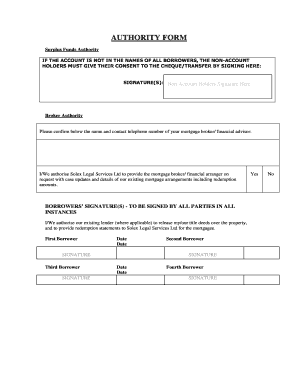
- Click ‘Get Form’ button to obtain the document and open it in the editor.
- Begin by entering your name in the designated field. Make sure to use the full legal name that appears on official identification.
- Next, provide your contact telephone number in the specified section. Ensure the number is accurate for effective communication.
- If applicable, indicate whether you are providing consent for non-account holders by signing in the space designated for their signatures.
- Enter the name and contact telephone number of your mortgage broker or financial advisor, ensuring their information is current.
- Authorize Solex Legal Services Ltd by signing in the borrowers’ signature section. All parties must provide their signatures where indicated.
- Finally, confirm the date next to your signature. This step is crucial as it records the date of your authorization.
- Once you have filled out all fields, review the form for accuracy. Make any necessary adjustments before submission.
- When satisfied with the information, save your changes. You can also download or print the form for your records.
- Share the completed form with relevant parties as required.
Complete your documents online today for a hassle-free experience.
contact@solexlegalservices.com. If you do not already have a case, please E-mail: info@solexlegalservices.com.