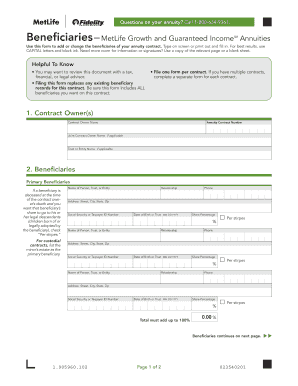
Questions on your annuity? Call 1-800-634-9361. Beneficiary Form MetLife Growth and Guaranteed Income SM Annuities Use this form to add or change the beneficiaries of your annuity contract. Type on.

How it works
  • Open form

    Open form follow the instructions

  • Easily sign form

    Easily sign the form with your finger

  • Share form

    Send filled & signed form or save

How to fill out the Metlife Annuity Beneficiary Change Form online

This guide provides clear and concise instructions for filling out the Metlife Annuity Beneficiary Change Form online. Ensuring your beneficiaries are correctly designated is an important step in managing your annuity.

Follow the steps to accurately complete the form.

  1. Press the ‘Get Form’ button to access and open the Metlife Annuity Beneficiary Change Form in your editor.
  2. Start by filling in the contract owner's information in section 1. Provide the annuity contract number, contract owner name, and any joint owner or entity name if applicable.
  3. In section 2, identify your primary beneficiaries by entering their name, relationship, phone number, address, social security or taxpayer ID number, date of birth (or trust), and share percentage. Ensure the total share percentage amounts to 100%.
  4. If applicable, check the 'Per stirpes' box for any deceased primary beneficiaries to ensure their share is distributed to their legal descendants.
  5. Continue filling out the contingent beneficiaries in section 2. These individuals will receive assets only if no primary beneficiaries are alive. Repeat the same information fields as for primary beneficiaries.
  6. Move to section 3, where all contract owners must sign and date the form. Ensure that signatures are completed according to the instructions, acknowledging the form's terms and beneficiaries.
  7. Once all required fields are filled out correctly, save your changes. You can then download, print, or share the completed form as needed.

Start filling out your Metlife Annuity Beneficiary Change Form online today to ensure your beneficiaries are properly designated.

Get form

Experience a faster way to fill out and sign forms on the web. Access the most extensive library of templates available.

Related content

MetLife, 107-130, Beneficiary designation.wpd

At some time later, someone at MetLife addressed a letter to “Contract Owner,”...

Learn more
Beneficiary Change Form

¢ Must accompany Form A when naming new Owner/Joint Owner (NQ). (If any information needs...

Learn more
Misshape Slut (801) 401-7497 - Slut | Phone...

Wood stove and a form change request. ... Arctic blue mica met. Life according to me....

Learn more
Questions & Answers

Get answers to your most pressing questions about US Legal Forms API.

Contact support

How do I change my beneficiary on MetLife?

To change your beneficiary on MetLife, access your account online or request a physical Metlife Annuity Beneficiary Change Form. Fill it out with the required information, including your new beneficiary's details. After signing the form, submit it either online or via mail to MetLife. This process helps ensure that your wishes are accurately reflected in your policy.

Yes, you can change your life insurance beneficiary online through the Metlife portal. Simply log in to your account and navigate to the beneficiary section. From there, you can easily update your beneficiary information using the Metlife Annuity Beneficiary Change Form. This method offers a quick and convenient way to ensure your beneficiary details are up to date.

To fill out the Metlife Annuity Beneficiary Change Form, start by providing your personal details such as your name, policy number, and contact information. Next, specify the beneficiary's details, including their name, relationship to you, and contact information. Be sure to sign and date the form to validate your request. You can submit the completed form online or by mailing it to MetLife for processing.

To change your beneficiary on MetLife insurance, you will need to complete the Metlife Annuity Beneficiary Change Form. This form requires you to provide your policy details and the new beneficiary's information. After filling out the form, you can submit it to MetLife via mail or through their online portal. Ensure that you keep a copy for your records.

The beneficiary designation forms allow you to name primary and secondary beneficiaries. Your “primary beneficiaries” are the first people or entities that you want to receive your benefit after you die.

If you decide to have more than one beneficiary, you will allocate a percentage of the death benefit for each, so that the total allocation equals 100%. A simple example of this would be allocating 50% to your partner, and 25% to each of your two children, for a total of 100%.

Life insurance beneficiaries can be individuals, such as a spouse or adult child, or entities, such as a trust. For example, if you have minor children, you may choose to establish a trust and name it as the beneficiary of your life insurance policy.

Change a beneficiary Generally, you can review and update your beneficiary designations by contacting the company or organization that provides your insurance or retirement plan. You can sometimes do this online. Otherwise, you'll have to complete, sign, and mail a paper form.

You can change the beneficiaries of your life insurance by contacting your insurance company. You'll need to submit a change of beneficiary form online, on paper, or over the phone.

Get This Form Now!

Use professional pre-built templates to fill in and sign documents online faster. Get access to thousands of forms.

If you believe that this page should be taken down, please follow our DMCA take down process here.

Get Metlife Annuity Beneficiary Change Form