Loading
Get Talawanda Transportation
How it works
-

Open form follow the instructions
-

Easily sign the form with your finger
-

Send filled & signed form or save
How to fill out the Talawanda Transportation online
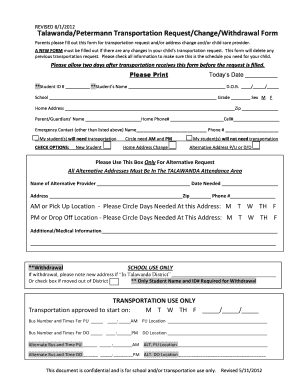
Filling out the Talawanda Transportation form is an essential process for parents and guardians to ensure that their children's transportation needs are met. This guide provides clear, step-by-step instructions for completing the online form effectively.
Follow the steps to complete the form accurately.
- Click ‘Get Form’ button to access the form and open it in the editor.
- Enter today’s date in the designated field to indicate when the form is being completed.
- Provide the student's ID number and full name in the respective fields, ensuring accuracy in spelling.
- Fill in the date of birth of the student in the format provided (MM/DD/YYYY).
- Select the student's school from the drop-down list and indicate their current grade.
- Enter the home address of the student, including the zip code.
- Provide the name of the parent or guardian filling out the form, along with their home and cell phone numbers.
- List an emergency contact name and their phone number, which should be different from the guardian's provided earlier.
- Indicate if the student will need transportation by circling 'AM' and 'PM' as necessary or selecting 'will not need transportation.'
- Check any relevant options such as 'New Student' or 'Home Address Change' to clarify your request.
- If applicable, provide alternative addresses for pick-up or drop-off, ensuring they fall within the Talawanda attendance area.
- Fill in the name of the alternative care provider, the date needed, and their address with contact information if applicable.
- Detail any additional or medical information that the transportation department needs to know about the student.
- If withdrawing a student, provide a new address if within the Talawanda district or check the box for moving out of the district.
- Once all sections are filled, review the information for accuracy before completing the form.
- Save the changes made, and download or print the form as needed. You may also share it with the relevant school transportation officials.
Complete your Talawanda Transportation document online today to ensure your child's transportation needs are met.
Related links form
Consolidate Data Select the sheet where the consolidated data will be placed. Click the cell in the worksheet where you want to place the consolidated data. Click the Data tab on the ribbon. Click the Consolidate Data button in the Data Tools group. ... Select a function from the list. ... Click the Collpase Dialog Box button.
Industry-leading security and compliance
US Legal Forms protects your data by complying with industry-specific security standards.
-
In businnes since 199725+ years providing professional legal documents.
-
Accredited businessGuarantees that a business meets BBB accreditation standards in the US and Canada.
-
Secured by BraintreeValidated Level 1 PCI DSS compliant payment gateway that accepts most major credit and debit card brands from across the globe.