Loading
Form preview
  • US Legal Forms
  • Other Templates
  • More Forms
  • More Uncategorized Forms
  • 2012 2013 Official Texas Usag Entry Form

Get 2012 2013 Official Texas Usag Entry Form

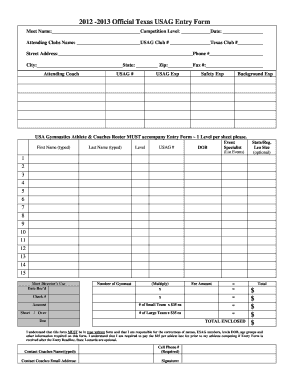
2012 -2013 Official Texas USAG Entry Form Meet Name Competition Level Date Attending Clubs Name USAG Club Texas Club Street Address Phone City State Attending Coach Zip USAG USAG Exp Fax Safety Exp Background Exp USA Gymnastics Athlete Coaches Roster MUST accompany Entry Form 1 Level per sheet please.

How it works

  1. Open form

    Open form follow the instructions

  2. Easily sign form

    Easily sign the form with your finger

  3. Share form

    Send filled & signed form or save

How to fill out the 2012 2013 Official Texas Usag Entry Form online

Filling out the 2012 2013 Official Texas Usag Entry Form online is an essential step in registering for competitions. This guide provides clear instructions to help you complete each section of the form accurately and efficiently.

Follow the steps to complete the entry form online.

  1. Click ‘Get Form’ button to obtain the form and open it for editing.
  2. Begin by filling in the meet name, competition level, and date of the event at the top of the form. Make sure to provide accurate information to avoid any discrepancies.
  3. Next, enter the name of the attending club, including the USAG Club number and Texas Club number. This information is crucial for identifying your registration.
  4. Provide the street address, phone number, city, state, and zip code for the club. Ensure all details are correct for effective communication.
  5. Fill in the contact details for the attending coach, including their USAG number, expiration date, background expiration date, fax number, and safety expiration date.
  6. List the first name, last name, USAG number, date of birth, level, event specialization (if applicable), and state/region for each athlete on the form.
  7. Indicate the leotard size, if applicable, and verify that all athletes are listed with their correct information.
  8. Calculate the total number of gymnasts and the corresponding fees. Ensure you accurately complete the fee structure based on your entries.
  9. In the section for meet director’s use, enter the date received and the check number. Provide the total amount enclosed to finalize your registration.
  10. Review the form for correctness and ensure all required information is filled in correctly. Typewritten format is mandatory.
  11. Finally, save your changes, download a copy for your records, and print it if necessary. You may share the completed form with the relevant parties.

Complete your entries and submit the form online to ensure a smooth registration process.

Get form

Experience a faster way to fill out and sign forms on the web. Access the most extensive library of templates available.
Get form

Related content

- EXAMINING THE OLYMPIC COMMUNITY'S ABILITY TO...
Frank Pallone, Jr., a Representative in Congress from the State of New ... While such...
Learn more
laniers gymnastics - University of Arkansas
Director of Gym Operations: Jaime Pisani (Arkansas, 2012)/1st year. Athletic Trainer:...
Learn more
Biggs Army Airfield - Wikipedia
Biggs Army Airfield (IATA: BIF, ICAO: KBIF, FAA LID: BIF) (formerly Biggs Air Force Base)...
Learn more

Related links form

RTI Application Form FORM A See Rule 31 - Zpmidwest 2020 Luovutuskirja Kips College Lahore 2020 Ram Raksha Stotra In Hindi Download 2020

Questions & Answers

Get answers to your most pressing questions about US Legal Forms API.

Contact support

A page break is an intentional division between pages in a Microsoft Word document. When you type a document with more than a page of words, Microsoft Word's default formatting moves the text to a new page after filling the first page. As you add or delete information, the text might move from one page to another.

Word automatically adds a break at the end of each page. You can also insert a manual page break anytime you want to start a new page in your document. Put your cursor where you want one page to end and the next to begin. Go to Insert > Page Break.

Use page breaks to control where a page ends and where a new page begins. Place the cursor where you want to start a new page.

A page break simply pushes any information after that page break onto the next page; a section break essentially splits your document into different parts to allow you to apply complex formatting to your document. A section break should not be used instead of a page break in your document.

Use page breaks to control where a page ends and where a new page begins. Insert a page break. Place the cursor where you want to start a new page.

A page break is a special marker that will end the current page and start a new one. Click to place your cursor where you want to start a new page.

Get This Form Now!

Use professional pre-built templates to fill in and sign documents online faster. Get access to thousands of forms.
Get form
If you believe that this page should be taken down, please follow our DMCA take down processhere.
Get 2012 2013 Official Texas Usag Entry Form
Get form
  • Adoption
  • Bankruptcy
  • Contractors
  • Divorce
  • Home Sales
  • Employment
  • Identity Theft
  • Incorporation
  • Landlord Tenant
  • Living Trust
  • Name Change
  • Personal Planning
  • Small Business
  • Wills & Estates
  • Packages A-Z
  • Affidavits
  • Bankruptcy
  • Bill of Sale
  • Corporate - LLC
  • Divorce
  • Employment
  • Identity Theft
  • Internet Technology
  • Landlord Tenant
  • Living Wills
  • Name Change
  • Power of Attorney
  • Real Estate
  • Small Estates
  • Wills
  • All Forms
  • Forms A-Z
  • Other Templates
  • Legal Hub
  • About Us
  • Help Portal
  • Legal Resources
  • Blog
  • Affiliates
  • Contact Us
  • Delete My Account
  • Site Map
  • Industries
  • Forms in Spanish
  • Localized Forms
  • State-specific Forms
  • Forms Kit
  • Real Estate Handbook
  • All Guides
  • Notarize
  • Incorporation services
  • For Consumers
  • For Small Business
  • For Attorneys
  • USLegal
  • FormsPass
  • pdfFiller
  • signNow
  • altaFlow
  • DocHub
  • Instapage
Form Packages
  • Adoption
  • Bankruptcy
  • Contractors
  • Divorce
  • Home Sales
  • Employment
  • Identity Theft
  • Incorporation
  • Landlord Tenant
  • Living Trust
  • Name Change
  • Personal Planning
  • Small Business
  • Wills & Estates
  • Packages A-Z
Form Categories
  • Affidavits
  • Bankruptcy
  • Bill of Sale
  • Corporate - LLC
  • Divorce
  • Employment
  • Identity Theft
  • Internet Technology
  • Landlord Tenant
  • Living Wills
  • Name Change
  • Power of Attorney
  • Real Estate
  • Small Estates
  • Wills
  • All Forms
  • Forms A-Z
  • Other Templates
Customer Service
  • Legal Hub
  • About Us
  • Help Portal
  • Legal Resources
  • Blog
  • Affiliates
  • Contact Us
  • Delete My Account
  • Site Map
  • Industries
  • Forms in Spanish
  • Localized Forms
  • State-specific Forms
  • Forms Kit
Legal Guides
  • Real Estate Handbook
  • All Guides
Prepared for you
  • Notarize
  • Incorporation services
Our Customers
  • For Consumers
  • For Small Business
  • For Attorneys
Our Sites
  • USLegal
  • FormsPass
  • pdfFiller
  • signNow
  • altaFlow
  • DocHub
  • Instapage
Social Media
Call us now toll free:
+1 833 426 79 33
As seen in:
© Copyright 1999-2026 airSlate Legal Forms, Inc. 17 Station Street, Suite 303, Brookline, MA 02445
  • Your Privacy Choices
  • Terms of Service
  • Privacy Notice
  • Content Takedown Policy
  • Bug Bounty Program