Get Ncuc Form Wr2
How it works
-

Open form follow the instructions
-

Easily sign the form with your finger
-

Send filled & signed form or save
How to fill out the Ncuc Form Wr2 online
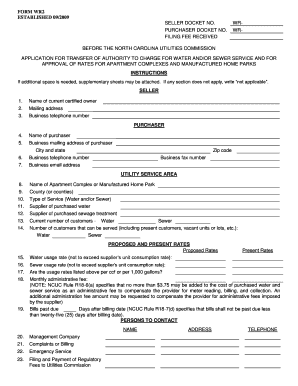
Filling out the Ncuc Form Wr2 online can be a straightforward process when approached step by step. This guide is designed to help users understand each component of the form and provide clear instructions for completion.
Follow the steps to successfully complete the Ncuc Form Wr2 online.
- Press the ‘Get Form’ button to obtain the Ncuc Form Wr2 and open it in your preferred document editor.
- In the 'Seller' section, enter the current certified owner's name, mailing address, and business telephone number.
- In the 'Purchaser' section, input the name of the purchaser, their business mailing address, city, state, zip code, business telephone number, email address, and fax number.
- For the 'Utility Service Area' section, fill in the name of the apartment complex or manufactured home park, the county or counties served, and specify the type of service (water and/or sewer). Additionally, list the supplier of purchased water and sewage treatment.
- Indicate the current number of water and sewer customers, as well as the number that can be served, including vacant units.
- In the 'Proposed and Present Rates' section, enter the proposed water and sewer usage rates, confirming they do not exceed the supplier’s consumption rates. Include the monthly administrative fee.
- Provide details concerning bills past due and the days after the billing date as prescribed by NCUC Rule R18-7(d).
- List contacts for management, complaints or billing, emergency services, and filing and payment of regulatory fees, filling in names and telephone numbers.
- Prepare your required exhibits by collecting necessary documentation such as articles of incorporation, partnership agreements, warranty deeds, vicinity maps, and supplier's schedule of rates.
- Review the filing instructions in the last section to ensure you have one original application, the required exhibits, notarized signatures, and the appropriate filing fee. Make sure to submit the application to the specified address.
- After reviewing everything for accuracy, download or save your changes, print the form, or share it as needed.
Complete your Ncuc Form Wr2 online today and ensure your application is filed correctly.
RUBS, or Ratio Utility Billing System, is a method of billing tenants for utilities based on factors like square footage or occupancy. In North Carolina, RUBS is legal, but it must comply with specific regulations set by the NCUC. Property owners should ensure transparency and fairness when implementing RUBS. To better understand your rights and any related forms, such as the Ncuc Form Wr2, you can explore resources available on the USLegalForms platform.