Loading
Get Booking Form - Brochure - Falcon Holidays
How it works
-

Open form follow the instructions
-

Easily sign the form with your finger
-

Send filled & signed form or save
How to fill out the Booking Form - Brochure - Falcon Holidays online
This guide provides a clear and supportive overview of how to effectively complete the Booking Form for Falcon Holidays. Whether you are booking a holiday for yourself or a group, this step-by-step process will help ensure accurate and efficient completion of the form.
Follow the steps to successfully fill out the Booking Form for Falcon Holidays.
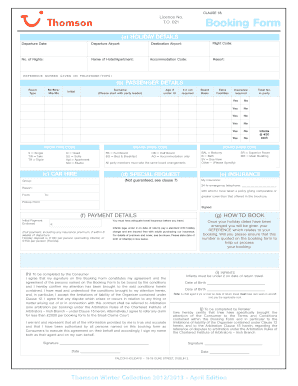
- Use the ‘Get Form’ button to access the Booking Form. This will allow you to download and open the form in your preferred editing tool.
- Begin by filling in the holiday details section. Specify the departure date, departure and destination airports, flight code, total number of nights, name of hotel or apartment, accommodation code, resort, and reference number provided during booking.
- Move on to the passenger details section. Indicate the room type for each traveler using the provided codes, and include their titles (e.g., Mr., Ms.), surnames, initials, and ages if they are under 18.
- Fill out the special request section if you have any specific needs, like a cot or additional facilities. Be sure to mark yes or no according to your requirements.
- In the insurance section, indicate if insurance is required for your group and provide details of any alternative insurance if applicable.
- If you opt for car hire, include the insurance details and emergency contact number. Also, specify the pick-up point and date range for the hire.
- Complete the payment details section. Ensure to include the initial payment amount and method, keeping in mind the holiday deposit and infant charges if applicable.
- Conclude by signing the form. Your signature confirms acknowledgment of the booking conditions and your agreement on behalf of all listed travelers.
- After completing the form, save the changes, and ensure to download, print, or share the form as needed.
Complete your booking form online today and embark on your next adventure!
Overview FormulaDescription=TEXT(1234.567,"$#,##0.00")Currency with a thousands separator and 2 decimals, like $1,234.57. Note that Excel rounds the value to 2 decimal places.=TEXT(TODAY(),"MM/DD/YY")Today's date in MM/DD/YY format, like 03/14/12=TEXT(TODAY(),"DDDD")Today's day of the week, like Monday8 more rows