Get Epsbtc Form
How it works
-

Open form follow the instructions
-

Easily sign the form with your finger
-

Send filled & signed form or save
How to fill out the Epsbtc Form online
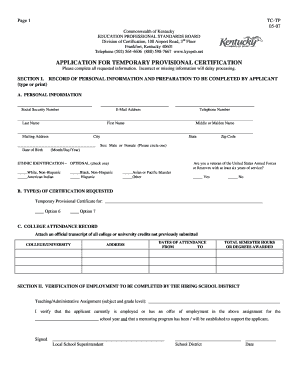
Filling out the Epsbtc Form online is a straightforward process designed to facilitate temporary provisional certification applications in Kentucky. This guide provides a detailed walkthrough of each section of the form, ensuring that users can navigate it with confidence and efficiency.
Follow the steps to complete the Epsbtc Form online.
- Click the ‘Get Form’ button to access the form and open it in the online editor.
- Begin with Section I by entering your personal information. This includes your last name, first name, middle or maiden name, Social Security number, email address, and telephone number. Ensure that all information is accurate to avoid processing delays.
- Fill out your mailing address, including the city, state, and zip code. Then, provide your date of birth in the format of month/day/year.
- Indicate your sex by circling either 'Male' or 'Female.' Optional ethnic identification can be selected by checking one of the boxes provided.
- In Section IB, specify the types of certification you are requesting by noting your choice clearly, including Options 6 or 7 as applicable.
- Complete the college attendance record section by attaching an official transcript of all relevant college or university credits, and provide the name and address of your college along with the dates of attendance.
- Proceed to Section II, where a representative from the hiring school district must verify your employment details. Ensure that they complete this section accurately.
- In Section III, provide your name and Social Security number, and answer the character and fitness questions by circling 'yes' or 'no.' If any are answered 'yes', include a separate explanation.
- Sign and date the form in the designated area to affirm that all information provided is true and complete.
- Finally, review your completed form for accuracy, save any changes, and download or print the document as needed. You may also share it with the relevant parties.
Complete your Epsbtc Form online today to move forward with your certification process.
Renewing your food stamps in Kansas requires you to submit a renewal application before your benefits expire. You can do this online or by mail, making sure to include the Epsbtc Form with any updated information. It's essential to stay on top of your renewal to prevent any interruptions in your benefits. If you have questions during the renewal process, consider reaching out to uslegalforms for assistance.
Industry-leading security and compliance
-
In businnes since 199725+ years providing professional legal documents.
-
Accredited businessGuarantees that a business meets BBB accreditation standards in the US and Canada.
-
Secured by BraintreeValidated Level 1 PCI DSS compliant payment gateway that accepts most major credit and debit card brands from across the globe.