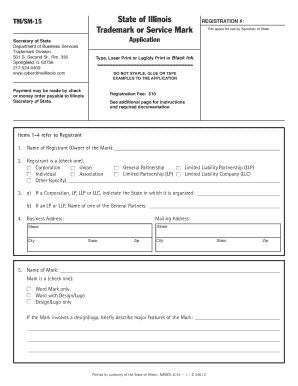
Get State Of Illinois: Trademark Or Servicemark Application - Cyberdrive ...
How it works
-

Open form follow the instructions
-

Easily sign the form with your finger
-

Send filled & signed form or save
How to use or fill out the State Of Illinois: Trademark Or Servicemark Application - CyberDrive online
Filing a trademark or servicemark application in the State of Illinois is a crucial step in safeguarding your brand. This guide provides clear, step-by-step instructions on how to complete the application online, ensuring that you understand each section and the information required to successfully register your mark.
Follow the steps to fill out the State Of Illinois: Trademark Or Servicemark Application online.
- Click the ‘Get Form’ button to obtain the form and open it in the editor. This will allow you to begin filling out the application.
- Provide the name of the registrant, which is the owner of the mark. The name should be printed clearly either in typed or legible black ink.
- Indicate the type of registrant by checking the appropriate box. Options include corporation, union, individual, and various business entities.
- Fill out the business address and the mailing address. Ensure that the mailing address is accurate for future correspondence.
- For corporations, limited partnerships, or limited liability companies, complete the additional fields indicating the state of organization and the name of a general partner if applicable.
- Enter the name of the mark. Specify type by checking the box for whether it is a word mark, word with design/logo, or a design/logo only.
- If the mark includes a design or logo, provide a brief description of its major features to give clarity on its appearance and uniqueness.
- List the specific goods or services associated with the mark. It is essential to provide a detailed description, as this will define the scope of protection.
- Enter the classification number that corresponds to the nature of the goods or services. Reference the instruction page for guidance on classification.
- For trademarks, check how the mark is applied (e.g., directly to goods) by marking the applicable boxes. For service marks, indicate how the mark is displayed (e.g., in advertisements).
- Document the date of first use of the mark both generally and specifically in Illinois. Ensure these dates reflect the true first use of the mark.
- State any knowledge of previous owners or users of the mark. If there are no prior users known, provide an N/A response.
- Complete the application with your signature. Ensure that your contact information is included, as this is required for official communication.
- After filling out all sections, review the application for accuracy. You can then save changes, download, print, or share the completed form.
Start your trademark or servicemark registration process online today!
To register your business with the Illinois Secretary of State, begin by selecting the appropriate business structure, such as an LLC or corporation. Complete the necessary forms, which are available on the CyberDrive website, and gather required documentation. Finally, submit your application along with the filing fees. This registration not only legitimizes your business but also protects your brand.
Industry-leading security and compliance
-
In businnes since 199725+ years providing professional legal documents.
-
Accredited businessGuarantees that a business meets BBB accreditation standards in the US and Canada.
-
Secured by BraintreeValidated Level 1 PCI DSS compliant payment gateway that accepts most major credit and debit card brands from across the globe.