Loading
Get Transfast Login
How it works
-

Open form follow the instructions
-

Easily sign the form with your finger
-

Send filled & signed form or save
How to fill out the Transfast Login online
Filling out the Transfast Login form is an essential step for users seeking to establish an account. This guide will provide a clear and supportive walkthrough of each section, ensuring that you have the necessary information to complete the form accurately.
Follow the steps to successfully complete the Transfast Login form.
- Click ‘Get Form’ button to obtain the form and open it for completion.
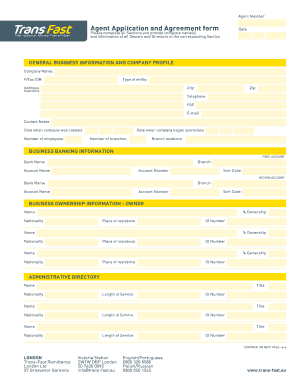
- Begin by providing the general business information. Fill in your company name and federal tax identification number (F/Tax ID#). Specify the type of entity, enter your business address, city, zip, telephone number, fax number, email, contact name, and the date when your company was created. Additionally, include the number of employees and branches, along with their locations.
- Proceed to the business banking information section. For the first account, indicate the bank name, branch, account name, account number, and sort code. Repeat this process for the second account, ensuring all fields are correctly filled out.
- In the business ownership information section, input the names, percentage of ownership, nationality, place of residence, and ID number for each owner.
- Complete the administrative directory by listing the names, nationalities, titles, length of service, and ID numbers for key personnel within your organization.
- For the registration license, provide the name and license number of the supervising authority in the UK, as well as the authority responsible for issuing licenses for your business.
- In the anti-money laundering section, indicate whether your company has established a program for money laundering prevention, including the date established and the last review date of the program.
- Detail the representative legal information, including the surname, first name, date of birth, nationality, passport number, and marital status. Include the working permit and national insurance number as applicable.
- Provide your British address and corresponding contact details, followed by your address in your country of origin.
- Include emergency contact information in the UK, detailing the name, phone number, and status.
- Fill out the references section with each reference's name, relationship, address, country, and contact information.
- List individuals authorized to access the Transfast program, including their names and ID numbers. Lastly, affirm the truthfulness of the information provided by signing and dating the designated area.
- Once all sections are completed, review the form for accuracy. After ensuring that all required information is provided, you may save changes, download, print, or share the completed form as necessary.
Complete the Transfast Login form online today for a seamless account setup.
Yes, you can claim your Transfast remittance online with ease. Simply visit the Transfast website and use your Transfast Login credentials to access your account. Once logged in, you will find options to view and claim your remittance. This convenient method allows you to manage your funds without needing to visit a physical location.
Industry-leading security and compliance
US Legal Forms protects your data by complying with industry-specific security standards.
-
In businnes since 199725+ years providing professional legal documents.
-
Accredited businessGuarantees that a business meets BBB accreditation standards in the US and Canada.
-
Secured by BraintreeValidated Level 1 PCI DSS compliant payment gateway that accepts most major credit and debit card brands from across the globe.