Loading
Get Eesti Kenneliit
How it works
-

Open form follow the instructions
-

Easily sign the form with your finger
-

Send filled & signed form or save
How to fill out the Eesti Kenneliit online
This guide provides detailed instructions for completing the Eesti Kenneliit entry form online. By following these steps, users will ensure that their submissions are accurate and complete.
Follow the steps to successfully fill out the Eesti Kenneliit entry form.
- Click ‘Get Form’ button to access the entry form and open it in your preferred editor.
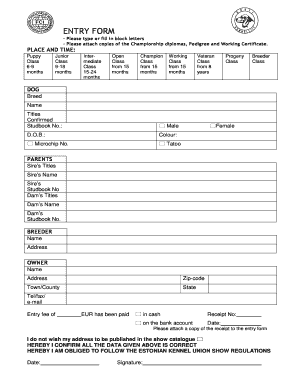
- Begin by entering your dog's breed and name in the designated fields. It is essential to type these details clearly to avoid any errors.
- Select the applicable class for your dog from the options: Puppy, Junior, Intermediate, Open, Champion, Working, Veteran, Progeny, or Breeder Class. Ensure that you choose the correct age category.
- Provide your dog's details, including titles, confirmed studbook number (if applicable), date of birth, color, and microchip or tattoo number. Accurate information is crucial for proper classification.
- Fill in the names and titles of both the sire and dam, along with their respective studbook numbers. This information is fundamental for pedigree verification.
- Include your personal details as the breeder and owner, which should consist of names, addresses, zip code, town or county, state, and contact information (telephone, fax, and email).
- Indicate whether the entry fee has been paid, specifying the amount in euros, and provide the receipt number. Remember to attach a copy of the payment receipt to the form.
- If you prefer not to have your address published in the show catalogue, be sure to check the relevant box.
- Confirm that all the information provided is correct and that you agree to follow the Estonian Kennel Union show regulations. This is typically done by signing and dating the form.
- Once you have completed all sections of the form, save your changes. You may then download, print, or share the document as needed.
Complete your Eesti Kenneliit entry form online today for a seamless experience.
Related links form
The Excel CONCATENATE function is used to join up to 30 text items and return the result as a text. The Excel Concatenate formula is as follows: =CONCATENATE (text1, text2, [text3], ...)
Industry-leading security and compliance
US Legal Forms protects your data by complying with industry-specific security standards.
-
In businnes since 199725+ years providing professional legal documents.
-
Accredited businessGuarantees that a business meets BBB accreditation standards in the US and Canada.
-
Secured by BraintreeValidated Level 1 PCI DSS compliant payment gateway that accepts most major credit and debit card brands from across the globe.