Loading
Form preview
  • US Legal Forms
  • Form Library
  • More Forms
  • More Uncategorized Forms
  • Vorm A1.ai - Maksu - Emta

Get Vorm A1.ai - Maksu - Emta

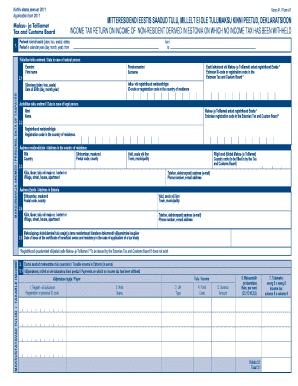
Kehtiv alates jaanuar 2011 Applicable from 2011 Maksu- ja Tolliamet Tax and Customs Board Vorm A1 / Form A1 MITTERESIDENDI EESTIS SAADUD TULU, MILLELT EI OLE TULUMAKSU KINNI PEETUD, DEKLARATSIOON.

How it works

  1. Open form

    Open form follow the instructions

  2. Easily sign form

    Easily sign the form with your finger

  3. Share form

    Send filled & signed form or save

How to fill out the Vorm A1.ai - Maksu - Emta online

The Vorm A1.ai - Maksu - Emta is a tax declaration form for non-residents receiving income in Estonia, where no income tax has been withheld. This guide will provide clear, step-by-step instructions for filling out the form online, ensuring you can complete it accurately and efficiently.

Follow the steps to fill out the Vorm A1.ai - Maksu - Emta online easily.

  1. Press the ‘Get Form’ button to access the form and open it in your digital editor.
  2. Begin with filling out the period of the calendar year during which you received income in Estonia. Enter the start date in the 'From' field and the end date in the 'To' field.
  3. Proceed to the 'Personal data of taxpayer' section. Select whether you are a natural person or a legal entity. Fill in your first name and surname, along with your date of birth in the appropriate format.
  4. For natural persons, provide your Estonian ID code or the registration code assigned by the Estonian Tax and Customs Board. If you do not possess this code, you may need to obtain it by contacting them.
  5. Legal entities must fill in their name and registration code in the country of residence, along with the Estonian registration code if available.
  6. Complete the address fields in your country of residence and Estonia, ensuring to include the postal code, county, and municipality.
  7. Include your contact details like phone number and email address in the specified section.
  8. If applicable, indicate the date of issue for the certificate of beneficial owner and residency.
  9. In the 'Taxable income' section, begin with section 3.1 where you will declare your income received in Estonia. Enter the details of each payment on which no income tax has been withheld.
  10. Input the payer's registration or personal ID code, their name, the type of income, the code, amount, and applicable tax rate for each entry.
  11. After completing all entries under section 3.1, total the amounts accordingly.
  12. If you have received income under an investment life insurance contract, fill out section 3.2 with the appropriate details, following the instructions provided.
  13. Confirm that all data entered is correct. Review the declaration to ensure every section is complete and accurate.
  14. Finally, submit your declaration online, then save your changes. You may also download, print, or share the completed form as required.

Complete your Vorm A1.ai - Maksu - Emta online today for accurate tax reporting.

Get form

Experience a faster way to fill out and sign forms on the web. Access the most extensive library of templates available.
Get form

Related content

NC DHSR HPCON: Exemption for Duke University...
Jul 16, 2019 — A1. Duke Cancer Center. "Front Side. ARCHITECTURAL DRAWINGS. Floor Plans...
Learn more
2006 Updates Clinical Practice Guidelines and ...
SECTION I: USE OF THE CLINICAL PRACTICE GUIDELINES AND CLINICAL PRACTICE. RECOMMENDATIONS...
Learn more
Instruction 57a8061ef1094968b021f8f25443d441
May 30, 2016 — WARNING: For your safety, it is required that the plug. attached to the...
Learn more

Related links form

India Kerala Form 20C 2005 India Kotak Request for Major Revival of Policy 2018 India Kotak Request for Major Revival of Policy 2011 School Bonafide Certificate Pdf No No Download Needed Needed 2015

Questions & Answers

Get answers to your most pressing questions about US Legal Forms API.

Contact support

0:06 5:28 Concatenate Excel Tutorial - YouTube YouTube Start of suggested clip End of suggested clip Text in microsoft excel. And as full disclosure. Before we jump into this i work at microsoft. It'sMoreText in microsoft excel. And as full disclosure. Before we jump into this i work at microsoft. It's something i got to say for hr purposes. Especially when i talk about microsoft. Stuff.

In formal language theory and computer programming, string concatenation is the operation of joining character strings end-to-end. For example, the concatenation of "snow" and "ball" is "snowball".

How to Combine Data Using the CONCAT Function Choose a cell for the combined data to be placed. Please type =CONCAT(. Choose the cell you would like to combine first. Add spaces, commas, or other text. Use quotation marks to separate the cells you are combining. Enter the formula within parenthesis.

CONCAT takes a variable number of string arguments and concatenates (or joins) them into a single string. It requires a minimum of two input values; otherwise, CONCAT will raise an error. CONCAT implicitly converts all arguments to string types before concatenation.

Combine data using the CONCAT function Type =CONCAT(. Select the cell you want to combine first. Use commas to separate the cells you are combining and use quotation marks to add spaces, commas, or other text. Close the formula with a parenthesis and press Enter.

Text concatenation operator Use the ampersand (&) to join, or concatenate, one or more text strings to produce a single piece of text. Text operator. Meaning. Example. & (ampersand)

The word concatenate is just another way of saying "to combine" or "to join together". The CONCATENATE function allows you to combine text from different cells into one cell. In our example, we can use it to combine the text in column A and column B to create a combined name in a new column.

strcat() — Concatenate Strings The strcat() function concatenates string2 to string1 and ends the resulting string with the null character. The strcat() function operates on null-ended strings. The string arguments to the function should contain a null character (\0) that marks the end of the string.

Get This Form Now!

Use professional pre-built templates to fill in and sign documents online faster. Get access to thousands of forms.
Get form
If you believe that this page should be taken down, please follow our DMCA take down processhere.
Get Vorm A1.ai - Maksu - Emta
Get form
  • Adoption
  • Bankruptcy
  • Contractors
  • Divorce
  • Home Sales
  • Employment
  • Identity Theft
  • Incorporation
  • Landlord Tenant
  • Living Trust
  • Name Change
  • Personal Planning
  • Small Business
  • Wills & Estates
  • Packages A-Z
  • Affidavits
  • Bankruptcy
  • Bill of Sale
  • Corporate - LLC
  • Divorce
  • Employment
  • Identity Theft
  • Internet Technology
  • Landlord Tenant
  • Living Wills
  • Name Change
  • Power of Attorney
  • Real Estate
  • Small Estates
  • Wills
  • All Forms
  • Forms A-Z
  • Form Library
  • Legal Hub
  • About Us
  • Help Portal
  • Legal Resources
  • Blog
  • Affiliates
  • Contact Us
  • Delete My Account
  • Site Map
  • Industries
  • Forms in Spanish
  • Localized Forms
  • State-specific Forms
  • Forms Kit
  • Real Estate Handbook
  • All Guides
  • Notarize
  • Incorporation services
  • For Consumers
  • For Small Business
  • For Attorneys
  • USLegal
  • FormsPass
  • pdfFiller
  • signNow
  • altaFlow
  • DocHub
  • Instapage
Form Packages
  • Adoption
  • Bankruptcy
  • Contractors
  • Divorce
  • Home Sales
  • Employment
  • Identity Theft
  • Incorporation
  • Landlord Tenant
  • Living Trust
  • Name Change
  • Personal Planning
  • Small Business
  • Wills & Estates
  • Packages A-Z
Form Categories
  • Affidavits
  • Bankruptcy
  • Bill of Sale
  • Corporate - LLC
  • Divorce
  • Employment
  • Identity Theft
  • Internet Technology
  • Landlord Tenant
  • Living Wills
  • Name Change
  • Power of Attorney
  • Real Estate
  • Small Estates
  • Wills
  • All Forms
  • Forms A-Z
  • Form Library
Customer Service
  • Legal Hub
  • About Us
  • Help Portal
  • Legal Resources
  • Blog
  • Affiliates
  • Contact Us
  • Delete My Account
  • Site Map
  • Industries
  • Forms in Spanish
  • Localized Forms
  • State-specific Forms
  • Forms Kit
Legal Guides
  • Real Estate Handbook
  • All Guides
Prepared for you
  • Notarize
  • Incorporation services
Our Customers
  • For Consumers
  • For Small Business
  • For Attorneys
Our Sites
  • USLegal
  • FormsPass
  • pdfFiller
  • signNow
  • altaFlow
  • DocHub
  • Instapage
Social Media
Call us now toll free:
+1 833 426 79 33
As seen in:
© Copyright 1999-2026 airSlate Legal Forms, Inc. 3720 Flowood Dr, Flowood, Mississippi 39232
  • Your Privacy Choices
  • Terms of Service
  • Privacy Notice
  • Content Takedown Policy
  • Bug Bounty Program