Loading
Get Sonic Certificate Request Form
How it works
-

Open form follow the instructions
-

Easily sign the form with your finger
-

Send filled & signed form or save
How to fill out the Sonic Certificate Request Form online
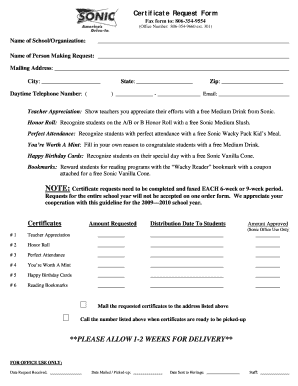
Filling out the Sonic Certificate Request Form online can simplify the process of recognizing students and teachers for their achievements. This guide will provide you with clear and detailed instructions to help you complete the form correctly and efficiently.
Follow the steps to complete your Sonic Certificate Request Form.
- Click ‘Get Form’ button to obtain the form and open it in the editor.
- Begin by entering the name of the school or organization in the designated field.
- Fill out the name of the person making the request to ensure proper attribution.
- Provide your mailing address, including the street address, city, state, and zip code, to ensure accurate delivery.
- Enter your daytime telephone number, including area code, and your email address for any potential follow-up.
- Indicate the number of certificates requested for each category such as Teacher Appreciation, Honor Roll, Perfect Attendance, You’re Worth A Mint, Happy Birthday Cards, and Reading Bookmarks.
- Specify the distribution date for the certificates to students in the appropriate section.
- Once all sections are complete, review the information for accuracy before submitting.
- Finish by saving your changes, and you can either download, print, or share the completed form.
Complete your Sonic Certificate Request Form online today!
To obtain a .crt file, you must first generate and submit a certificate request file to a certificate authority. After your request is processed, the CA will issue the digital certificate in the form of a .crt file. Using the Sonic Certificate Request Form can help ensure that your request is complete and accurate, facilitating a seamless transition to receiving your .crt file.