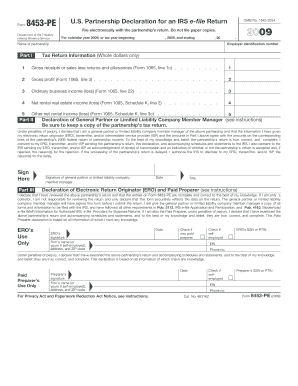
Form U.S. Partnership Declaration for an IRS e-file Return 8453-PE Department of the Treasury Internal Revenue Service 2009 File electronically with the partnership s return. Do not file paper copies.
Open form follow the instructions
Easily sign the form with your finger
Send filled & signed form or save
How to fill out the IRS Form 8453-PE online
Filing IRS Form 8453-PE is an essential step for partnerships submitting their tax returns electronically. This guide provides clear instructions to help users effectively complete the form online.
Follow the steps to successfully fill out the IRS Form 8453-PE
- Click ‘Get Form’ button to obtain the form and open it in the editor.
- Enter the partnership's name in the designated space. Ensure that you print or type the name clearly to avoid any processing issues.
- Input the employer identification number (EIN) of the partnership in the space provided. This number is critical for the IRS to identify the partnership.
- Complete Part I, which includes various fields like gross receipts, gross profit, ordinary business income or loss, net rental real estate income or loss, and other net rental income or loss. Enter whole dollar amounts only.
- In Part II, the general partner or limited liability company member manager must declare the information as true and correct. This section requires a manual signature and date.
- If you are an Electronic Return Originator (ERO) or a paid preparer, complete Part III only if filing through an ERO. Ensure that the ERO signs the form if applicable.
- After filling out all sections, review the form for accuracy. Make sure all required fields are completed correctly.
- Save the changes before proceeding. You can then download or print a copy for your records. Once confirmed, transmit the completed PDF file along with the electronically filed return.
Complete your IRS Form 8453-PE online today to ensure timely filing.
Experience a faster way to fill out and sign forms on the web. Access the most extensive library of templates available.
Related content
Information about Form 8453-PE, U.S. Partnership Declaration for an IRS e-file Return...
Aug 26, 2008 — Forms for Tax Year 2007 (Processing Year 2008). ... Form 8453-PE U.S...
Publication 4163 Modernized e-File (MeF) Information for Authorized IRS e-File ... Forms...
Get answers to your most pressing questions about US Legal Forms API.
Do I have to file form 8453?
Filing IRS Form 8453-PE is mandatory for partnerships that choose to e-file their tax returns. This form acts as a declaration of the partnership’s information and ensures compliance with IRS regulations. If you are unsure about your filing requirements, consider using resources like UsLegalForms to get the necessary guidance.
How to fill out a PDF tax form?
Filling out a PDF tax form requires a few simple steps. First, download the form from the IRS website or a reliable source. Next, use a PDF reader to fill in the required information accurately. Tools like UsLegalForms can help streamline this process, offering guidance and templates for completing forms like the IRS Form 8453-PE.
What is form 8453 PE?
Form 8453-PE is specifically tailored for partnerships that need to e-file their tax returns. This form acts as a declaration, confirming the accuracy of the partnership's tax information submitted electronically. Utilizing the IRS Form 8453-PE simplifies the filing process and helps partnerships stay organized and compliant with tax laws.
What is the purpose of form 8453?
The purpose of IRS Form 8453-PE is to provide a declaration for partnerships when e-filing their tax returns. This form ensures that the information submitted is accurate and compliant with IRS requirements. By using Form 8453-PE, partnerships can enjoy a seamless e-filing process and maintain proper documentation for their tax obligations.
Is the IRS really forgiving tax debt in 2025?
While discussions about tax debt forgiveness take place, it is essential to stay informed about IRS policies. As of now, there is no official confirmation regarding blanket forgiveness of tax debt in 2025. Taxpayers should continue to fulfill their obligations and consult reliable resources for the most current information regarding the IRS and tax regulations.
What is the difference between 8879 PE and 8453 PE?
The key difference lies in their purpose and application. The IRS Form 8879 PE is used for e-filing individual tax returns, while the IRS Form 8453-PE is specifically designed for partnerships. Both forms facilitate electronic filing, but they cater to different types of taxpayers and their specific needs.
What is the IRS form 8453 PE?
The IRS Form 8453-PE is a crucial document for partnerships that allows them to electronically file their tax returns. This form serves as a declaration of the partnership's information and confirms that the return is submitted accurately. By leveraging the IRS Form 8453-PE, partnerships streamline their filing process and enhance their compliance with tax regulations.
What is a PE declaration?
A PE declaration, or Partnership Entity declaration, is a document that confirms the partnership’s tax return information. It ensures that the partnership is reporting its income and expenses accurately to the IRS. By using the IRS Form 8453-PE, partnerships can e-file their returns while maintaining compliance with IRS regulations.
What is 8453 PE?
The Form 8453-PE is used by the preparer to obtain authorization from the client to transmit returns to the IRS. In lieu of the Form 8879-PE, the signed Form 8453-PE must be scanned into the return as a PDF document and transmitted with the return.
Do I have to send form 8453 to IRS?
If you are filing your tax return using an online provider, mail Form 8453 to the IRS within 3 business days after you have received acknowledgement from your intermediate service provider and/or transmitter that the IRS has accepted your electronically filed tax return.
Use professional pre-built templates to fill in and sign documents online faster. Get access to thousands of forms.
If you believe that this page should be taken down, please follow our DMCA take down process here.