Loading
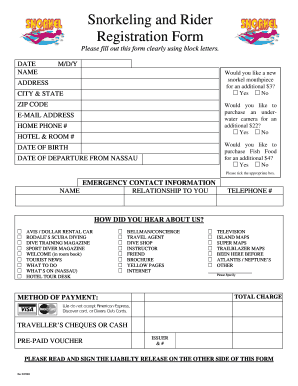
Get Release Form - Stuart Cove
How it works
-

Open form follow the instructions
-

Easily sign the form with your finger
-

Send filled & signed form or save
How to fill out the Release Form - Stuart Cove online
This guide provides clear instructions on how to efficiently fill out the Release Form for Stuart Cove online. By following these steps, you can ensure that the form is completed accurately and comprehensively.
Follow the steps to complete your Release Form online.
- Click the ‘Get Form’ button to access the Release Form and open it in your preferred document editor.
- Enter the date of your visit in the 'DATE' field, using the month, day, and year format (M/D/Y).
- Fill in your name in the designated 'NAME' section using block letters for clarity.
- Provide your address, including the city, state, and ZIP code in the appropriate fields.
- Indicate if you would like a new snorkel mouthpiece for an additional fee of $3 by selecting 'Yes' or 'No'.
- Select whether you want to purchase an underwater camera for an extra charge of $22 by choosing 'Yes' or 'No'.
- Provide your email address and home phone number in the respective sections.
- If you are staying in a hotel, enter the hotel name and your room number.
- Complete your date of birth and date of departure from Nassau in the specified fields.
- Fill out the emergency contact information, including the contact's name, relationship, and telephone number.
- Select how you heard about Stuart Cove from the list of options, and specify any other source if applicable.
- Calculate and enter the total charge for your purchases.
- Choose your method of payment, ensuring to note that American Express, Discover, and Diners Club Cards are not accepted.
- Read and sign the liability release agreement, which is located on the other side of the form, ensuring that you understand the terms.
- After completing the form, you can save changes, download a copy, print it, or share it as needed.
Complete your Release Form online today and prepare for your exciting adventure!
The purpose of a waiver form is to inform participants about the risks involved in an activity and to obtain their consent to participate despite those risks. By signing the form, individuals acknowledge that they understand these risks and agree not to pursue legal action if something goes wrong. The Release Form - Stuart Cove serves this purpose effectively, providing a straightforward way for participants to engage with confidence.
Industry-leading security and compliance
US Legal Forms protects your data by complying with industry-specific security standards.
-
In businnes since 199725+ years providing professional legal documents.
-
Accredited businessGuarantees that a business meets BBB accreditation standards in the US and Canada.
-
Secured by BraintreeValidated Level 1 PCI DSS compliant payment gateway that accepts most major credit and debit card brands from across the globe.