Loading
Get Application For Supplemental Security Income - Disability Claims Clinic
This website is not affiliated with any governmental entity
How it works
-

Open form follow the instructions
-

Easily sign the form with your finger
-

Send filled & signed form or save
How to fill out the Application For Supplemental Security Income - Disability Claims Clinic online
Filling out the Application For Supplemental Security Income can feel overwhelming, but this guide is here to assist you. Follow these straightforward steps to complete the application online, ensuring you provide all necessary information for your disability claim.
Follow the steps to successfully complete your application.
- Click ‘Get Form’ button to obtain the form and open it in the editor.
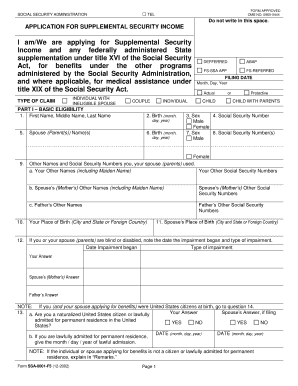
- Begin by filling out your personal information in Part I. This includes your first name, middle name, last name, birthdate, and social security number. Ensure accuracy as this information is crucial for your application.
- In Part I, indicate your marital status and those of any dependents by selecting the appropriate checkbox. You will also be asked to enter the names and social security numbers of your spouse or parents.
- Continue to Part II to provide details about your current living arrangements. Mark the box that best describes your residence and who you live with. If applicable, use the ‘Remarks’ section for any necessary clarifications.
- In Part III, list your resources as of the filing date. Circle the items that apply and provide their cash value. This includes cash, accounts, properties, or any assets you or your spouse own.
- Part IV requires you to outline your income. List all sources of income, including wages, benefits, and any financial support you receive. Be thorough and note any income that is expected to stop.
- Proceed to Part V to answer questions about food stamp benefits. Indicate whether you are currently receiving food stamps or if you would like to apply for them.
- In Part VI, if you are applying for benefits on behalf of someone else, fill out their details. Otherwise, move to Part VII for any additional remarks or explanations regarding your application.
- In Part VIII, complete the signature section by signing and dating the form. Provide your contact number for follow-ups. If applicable, have your spouse sign as well.
- After filling out the form, review all your entries for accuracy. Once satisfied, you can save changes, download, print, or share the form as needed.
Complete your Supplemental Security Income application online today to ensure you have your benefits processed efficiently.
Related links form
Effective January 1, 2023 State Supplementary Payment (SSP): $578.82.