Loading
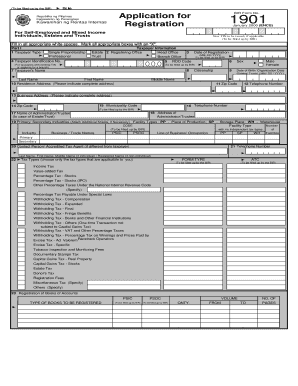
Get Application For Registration
How it works
-

Open form follow the instructions
-

Easily sign the form with your finger
-

Send filled & signed form or save
How to fill out the Application For Registration online
This guide provides a clear and concise overview of how to effectively fill out the Application For Registration online. By following each step, you will ensure that your application is complete and submitted accurately.
Follow the steps to complete your application online successfully.
- Press the ‘Get Form’ button to access the Application For Registration and open it for editing.
- Begin with Part I by selecting your taxpayer type. Choose between single proprietorship, professional, estate, or trust, and mark your selection with an 'X'.
- Fill in your taxpayer identification number (TIN), if applicable, and enter the date of registration in the MM/DD/YYYY format.
- Provide your full name: last name, first name, and middle name in the designated fields.
- Indicate your citizenship and date of birth (or organization date for estates/trusts) in the appropriate sections.
- Enter your complete residence address, including zip code and telephone number.
- If applicable, include your business address along with the municipality code and zip code.
- For estates and trusts, fill out the name and address of the administrator or trustee.
- List your primary and secondary industries, including facility types, and ensure that necessary codes are assigned.
- Complete the section for contact person or accredited tax agent, if different from the taxpayer.
- Select the applicable tax types by marking the boxes that correspond to your situation.
- Lastly, complete the registration of books of accounts by indicating the type, volume, quantity, and number of pages if necessary.
- Review all information for accuracy, save any changes, and prepare to download, print, or share the completed form.
Complete your Application For Registration online today for a smooth filing process.
Filling a vehicle registration form involves detailing the essential data about your vehicle and yourself. Begin with the vehicle's specifics, such as its identification number and title information. Then, enter your contact information and any applicable fees. For those seeking a straightforward process, consider using US Legal forms to simplify your Application For Registration and ensure all requirements are met.