Loading
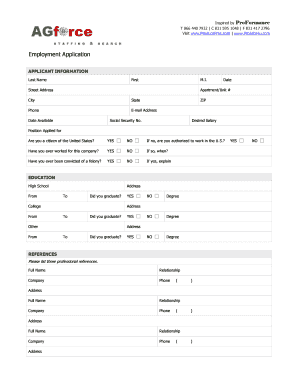
Get Agforce Employment Application (simple Version)
How it works
-

Open form follow the instructions
-

Easily sign the form with your finger
-

Send filled & signed form or save
How to fill out the AGforce Employment Application (Simple Version) online
This guide provides clear and structured instructions for individuals completing the AGforce Employment Application (Simple Version) online. Follow the steps outlined below to ensure that you fill out the application accurately and effectively.
Follow the steps to successfully complete your application form.
- Click ‘Get Form’ button to obtain the AGforce Employment Application and open it in the online editor.
- Begin with the applicant information section. Enter your last name, first name, and middle initial in the respective fields. Provide your current street address, apartment or unit number (if applicable), city, state, ZIP code, phone number, and email address. Specify the date you are filling out the form and the date you are available to start.
- Input your Social Security number and the desired salary for the position you are applying for. Select the specific position you are applying for from the designated options.
- Indicate your citizenship status by selecting 'Yes' or 'No'. If you select 'No', please specify if you are authorized to work in the U.S.
- Answer whether you have ever worked for this company before by selecting 'Yes' or 'No', and if so, provide the relevant dates.
- Respond to the question regarding felony convictions by selecting 'Yes' or 'No'. If you select 'Yes', provide an explanation as required.
- Proceed to the education section. Fill out your high school information, including the dates attended, address, and whether you graduated.
- Continue with any college education, specifying the institution, dates, degree obtained (if applicable), and graduation status.
- If applicable, provide information for any additional educational institutions attended.
- Move on to the references section. List three professional references by providing their full name, relationship to you, company, and phone number, along with their address.
- Fill out the previous employment details. For each position held, provide the company name, phone number, address, supervisor's name, job title, starting and ending salary, and duration of employment. Include responsibilities and reasons for leaving.
- Indicate whether you permit contact with your previous supervisor for a reference.
- If applicable, complete the military service section by providing branch, dates of service, rank at discharge, type of discharge, and any necessary explanations.
- Finally, read and accept the disclaimer and signature section. Confirm that all information is true, sign, and date the application.
- After completing all sections, you can save changes, download, print, or share the application as needed.
Complete your AGforce Employment Application (Simple Version) online today for a smoother application process.
Related links form
Creating an employee form involves outlining the specific information you wish to collect. The AGforce Employment Application (Simple Version) serves as an excellent foundation for this task. It includes essential fields that streamline the process, allowing you to focus on what matters most—finding the right candidate for your organization.