Loading
Get Fireworks Permit
How it works
-

Open form follow the instructions
-

Easily sign the form with your finger
-

Send filled & signed form or save
How to fill out the Fireworks Permit online
Filling out the Fireworks Permit online is a straightforward process that requires precise information. This guide will help you navigate through each section of the permit to ensure compliance and facilitate a successful application.
Follow the steps to complete your Fireworks Permit application online.
- Press the ‘Get Form’ button to access the Fireworks Permit form and open it for editing.
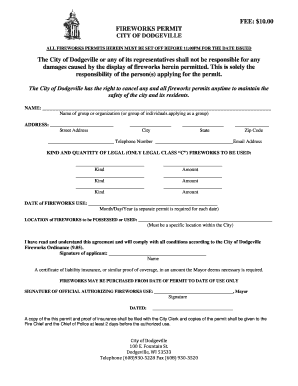
- In the 'Name' field, enter the name of the group or organization applying for the permit, or the name of the individuals applying as a group.
- Fill in the 'Address' section, providing the street address, city, state, and zip code.
- Enter the 'Telephone Number' and 'Email Address' to ensure communication regarding the permit.
- In the 'Kind and Quantity of Legal (only legal Class “C”) Fireworks to be Used' section, list the types of fireworks you intend to use and their corresponding amounts.
- Specify the 'Date of Fireworks Use' in the format Month/Day/Year. Remember, a separate permit is required for each date of use.
- In the 'Location of Fireworks to be Possessed or Used' section, provide a specific location within the City of Dodgeville for the fireworks display.
- Read the agreement and check the box if you have read and understand the terms. Sign your name in the 'Signature of Applicant' field.
- Ensure you have a certificate of liability insurance ready as proof of coverage is required.
- Lastly, save any changes made to the form, and you can choose to download, print, or share the completed permit as needed.
Complete your Fireworks Permit online today to ensure a safe and memorable display!
The legality of using fireworks in your backyard depends on your local laws. Some areas allow small fireworks without a permit, while others require a fireworks permit for any use. Safety is paramount, so always check with your local authorities before lighting fireworks. To ensure you have the right permits and comply with safety regulations, US Legal Forms can provide the necessary resources and guidance.