Loading
Form preview
  • US Legal Forms
  • Form Library
  • More Forms
  • More Uncategorized Forms
  • Oakland Alarm Permit

Get Oakland Alarm Permit

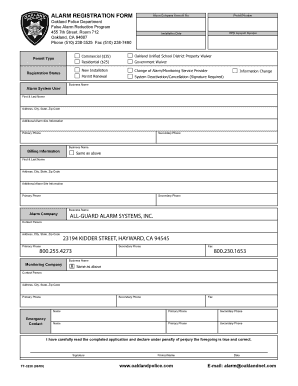
ALARM REGISTRATION FORM Alarm Company Account No. Permit Number Installation Date OPD Account Number Oakland Police Department False Alarm Reduction Program 455 7th Street, Room 712 Oakland, CA 94607.

How it works

  1. Open form

    Open form follow the instructions

  2. Easily sign form

    Easily sign the form with your finger

  3. Share form

    Send filled & signed form or save

How to fill out the Oakland Alarm Permit online

The Oakland Alarm Permit is an essential document for registering your alarm system with the local authorities. Completing this permit online ensures a smoother and more efficient registration process, allowing for prompt action if needed.

Follow the steps to successfully complete the Oakland Alarm Permit online.

  1. Click ‘Get Form’ button to obtain the Oakland Alarm Permit and open it in your document editor.
  2. Fill in the 'Alarm Company Account No.' and 'Permit Number' if applicable. If you are a new user, you may leave these blank.
  3. Indicate the installation date of your alarm system in the designated field.
  4. Provide your OPD Account Number if you have one, which is essential for identification.
  5. Select the permit type by checking the relevant box next to either 'Commercial,' 'Residential,' or any other applicable category.
  6. If applicable, check the box for waivers such as 'Oakland Unified School District Property Waiver' or 'Government Waiver'.
  7. Choose the registration status by selecting from options like 'New Installation,' 'Permit Renewal,' or 'System Deactivation/Cancellation.'
  8. Enter the name of the business or alarm system user in the 'Business Name' and 'Alarm System User' sections.
  9. Fill in the user’s full name, address, city, state, and zip code in the corresponding fields.
  10. Provide your primary and secondary phone numbers for contact purposes.
  11. If different, fill in the billing information by indicating 'Same as above' or completing the additional fields.
  12. Enter the relevant details for the alarm company, including contact person and their address, city, state, zip code, and phone numbers.
  13. Fill out the information for the monitoring company in the same manner as for the alarm company.
  14. Designate an emergency contact by entering their name and contact numbers.
  15. Carefully read the declaration statement and confirm that you have completed the application accurately.
  16. Sign the form and include your printed name and date of submission.
  17. Once all fields are completed, save your changes, download the document, print it for your records, or share it as needed.

Start filling out your Oakland Alarm Permit online today to ensure your alarm system is registered.

Get form

Experience a faster way to fill out and sign forms on the web. Access the most extensive library of templates available.
Get form

Related content

False Alarm Reduction Program - City of Oakland
Aug 31, 2018 — Oakland's Burglar Alarm Ordinance, adopted in 2009 (and available under...
Learn more
Policy 642 - Oakland University
Handicap Parking Permits must be secured from the Michigan Secretary of State. PROCEDURES:...
Learn more
draft mitigation monitoring and reporting program...
Dec 24, 2013 — Former Oakland Army Base Redevelopment Project. Oakland ... issuance of a...
Learn more

Related links form

OR Property Line Adjustment Application - Linn County 2016 WA Colville Tribes Distribution Direct Deposit Authorization Form 2022 NY LDSS-4826 2023 MO QualityCraft Flooring Claim Form 2018

Questions & Answers

Get answers to your most pressing questions about US Legal Forms API.

Contact support

Yes, in Oakland, you need an Oakland Alarm Permit for most home security systems. This requirement helps the city manage emergency responses effectively. By obtaining a permit, you also ensure that your home security system complies with local regulations, which can help prevent fines and ensure proper monitoring. It is best to check the latest guidelines on the city's website.

Yes, you need an Oakland Alarm Permit for an ADT security system, just like any other alarm system. The permit ensures compliance with local regulations and helps prevent false alarms. If you are unsure about the process, the uslegalforms platform can assist you in navigating the permit requirements.

To get in touch with the Oakland permit office, you can call the number listed on the City of Oakland's official website. They can provide you with information regarding the Oakland Alarm Permit application process and answer any specific questions you may have. It's always a good idea to reach out if you need assistance.

Yes, a permit is required for any alarm system operating in Oakland. The Oakland Alarm Permit ensures that your alarm is registered and that emergency services are aware of its presence. Failing to obtain this permit can lead to penalties and complications with your security system.

Yes, you can install your own home security system, but it must still comply with the requirements for an Oakland Alarm Permit. Make sure that your system meets the necessary standards to avoid issues with permits and fines. Additionally, consider using the uslegalforms platform to guide you through the permit application process.

You can email the City of Oakland's permit office by using the contact information provided on their official website. Be sure to include your name, address, and a clear subject line regarding your inquiry about the Oakland Alarm Permit. This will help them respond to your request promptly.

To qualify for an Oakland Alarm Permit, your alarm system must meet specific standards set by the city. This includes having a reliable power source, a functioning monitoring service, and compliance with any installation guidelines. It's essential that you provide accurate information on your application to ensure a smooth permit process.

Yes, you need an Oakland Alarm Permit to legally operate an alarm system in Oakland. This requirement helps ensure that emergency services can respond effectively and that alarms are not triggered unnecessarily. Without the permit, you may face fines and your alarm system could be deemed illegal.

The cost for an alarm permit is $43. The cost to renew your alarm permit is $26.

An alarm user shall not operate, or cause to be operated, any alarm system without a valid alarm registration. A separate alarm registration is required for each alarm site having a distinct address.

Get This Form Now!

Use professional pre-built templates to fill in and sign documents online faster. Get access to thousands of forms.
Get form
If you believe that this page should be taken down, please follow our DMCA take down processhere.

Industry-leading security and compliance

US Legal Forms protects your data by complying with industry-specific security standards.
  • In businnes since 1997
    25+ years providing professional legal documents.
  • Accredited business
    Guarantees that a business meets BBB accreditation standards in the US and Canada.
  • Secured by Braintree
    Validated Level 1 PCI DSS compliant payment gateway that accepts most major credit and debit card brands from across the globe.
Get Oakland Alarm Permit
Get form
Form Packages
Adoption
Bankruptcy
Contractors
Divorce
Home Sales
Employment
Identity Theft
Incorporation
Landlord Tenant
Living Trust
Name Change
Personal Planning
Small Business
Wills & Estates
Packages A-Z
Form Categories
Affidavits
Bankruptcy
Bill of Sale
Corporate - LLC
Divorce
Employment
Identity Theft
Internet Technology
Landlord Tenant
Living Wills
Name Change
Power of Attorney
Real Estate
Small Estates
Wills
All Forms
Forms A-Z
Form Library
Customer Service
Your Privacy Choices
Terms of Service
Privacy Notice
Legal Hub
Content Takedown Policy
Bug Bounty Program
About Us
Help Portal
Legal Resources
Blog
Affiliates
Contact Us
Delete My Account
Site Map
Industries
Forms in Spanish
Localized Forms
State-specific Forms
Forms Kit
Legal Guides
Real Estate Handbook
All Guides
Prepared for You
Notarize
Incorporation services
Our Customers
For Consumers
For Small Business
For Attorneys
Our Sites
US Legal Forms
USLegal
FormsPass
pdfFiller
signNow
altaFlow
DocHub
Instapage
Social Media
Call us now toll free:
+1 833 426 79 33
As seen in:
  • USA Today logo picture
  • CBC News logo picture
  • LA Times logo picture
  • The Washington Post logo picture
  • AP logo picture
  • Forbes logo picture
© Copyright 1997-2026
airSlate Legal Forms, Inc.
3720 Flowood Dr, Flowood, Mississippi 39232
Form Packages
Adoption
Bankruptcy
Contractors
Divorce
Home Sales
Employment
Identity Theft
Incorporation
Landlord Tenant
Living Trust
Name Change
Personal Planning
Small Business
Wills & Estates
Packages A-Z
Form Categories
Affidavits
Bankruptcy
Bill of Sale
Corporate - LLC
Divorce
Employment
Identity Theft
Internet Technology
Landlord Tenant
Living Wills
Name Change
Power of Attorney
Real Estate
Small Estates
Wills
All Forms
Forms A-Z
Form Library
Customer Service
Your Privacy Choices
Terms of Service
Privacy Notice
Legal Hub
Content Takedown Policy
Bug Bounty Program
About Us
Help Portal
Legal Resources
Blog
Affiliates
Contact Us
Delete My Account
Site Map
Industries
Forms in Spanish
Localized Forms
State-specific Forms
Forms Kit
Legal Guides
Real Estate Handbook
All Guides
Prepared for You
Notarize
Incorporation services
Our Customers
For Consumers
For Small Business
For Attorneys
Our Sites
US Legal Forms
USLegal
FormsPass
pdfFiller
signNow
altaFlow
DocHub
Instapage
Social Media
Call us now toll free:
+1 833 426 79 33
As seen in:
  • USA Today logo picture
  • CBC News logo picture
  • LA Times logo picture
  • The Washington Post logo picture
  • AP logo picture
  • Forbes logo picture
© Copyright 1997-2026
airSlate Legal Forms, Inc.
3720 Flowood Dr, Flowood, Mississippi 39232