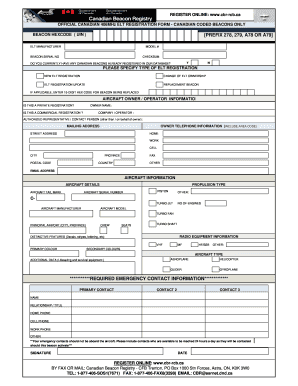
Get Official 406 Mhz Elt Registration Form Checksum
How it works
-

Open form follow the instructions
-

Easily sign the form with your finger
-

Send filled & signed form or save
How to use or fill out the Official 406 Mhz Elt Registration Form Checksum online
Completing the Official 406 MHz ELT Registration Form Checksum online is an essential step for ensuring your beacon is registered within the Canadian database. This guide will walk you through the process in a clear, concise manner, allowing for successful submission.
Follow the steps to fill out the official registration form online:
- Click ‘Get Form’ button to obtain the form and open it in the editor.
- Enter the beacon hex code (UIN), ensuring it starts with the correct prefix (278, 279, A78, or A79).
- Fill in the ELT manufacturer, model number, and the serial number of the beacon.
- For the checksum field, enter 'Y' to confirm the checksum is valid.
- Indicate whether you currently have any Canadian beacons registered in the database by selecting 'Y' or 'N'.
- Specify the type of ELT registration you are completing: select 'New ELT registration', 'Change of ELT ownership', 'ELT registration update', or 'Replacement beacon'.
- If applicable, enter the 15-digit hex code for the beacon being replaced.
- Complete the Aircraft Owner/Operator information section, including whether this is a private or commercial registration.
- Provide the owner's name, company/operator name, authorized representative's name, mailing address, and owner telephone information.
- Fill in the aircraft details, including the aircraft tail mark, propulsion type, serial number, and manufacturer.
- Include information about crew and seats, and provide data on radio equipment and distinctive features.
- Enter emergency contact information, ensuring that contacts are not aboard the aircraft and are available 24/7.
- Finally, sign and date the form.
- After completing all sections, review the form for accuracy. Save changes, download, print, or share the completed form as needed.
Complete your forms online to ensure your beacon registration is processed efficiently.
Related links form
To check if your EPIRB is registered, visit the official registration database of your country’s maritime authority. Simply enter your EPIRB's unique identification number, and the database will confirm its registration status. If you find that it is not registered, you should complete the Official 406 Mhz Elt Registration Form Checksum to ensure that your device is properly documented. Keeping your EPIRB registered is crucial for safety and compliance.
Industry-leading security and compliance
-
In businnes since 199725+ years providing professional legal documents.
-
Accredited businessGuarantees that a business meets BBB accreditation standards in the US and Canada.
-
Secured by BraintreeValidated Level 1 PCI DSS compliant payment gateway that accepts most major credit and debit card brands from across the globe.