Loading
Get 6568877888
How it works
-

Open form follow the instructions
-

Easily sign the form with your finger
-

Send filled & signed form or save
How to fill out the 6568877888 online
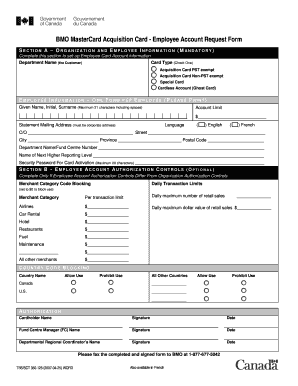
The 6568877888 form is essential for employees requesting a BMO MasterCard Acquisition Card. This guide will provide clear, step-by-step instructions to help users complete the form online effectively.
Follow the steps to successfully complete the 6568877888 form.
- Click ‘Get Form’ button to obtain the form and open it in the editor.
- In Section A, complete the organization and employee information. Select the appropriate card type by checking one of the provided options: Acquisition Card PST exempt, Acquisition Card Non-PST exempt, Special Card, or Cardless Account. Fill in the department name and provide the employee's given name, initial, and surname within the limit of 21 characters, including spaces.
- Next, specify the account limit for the card by entering the desired dollar amount. Provide the statement mailing address, ensuring it is a corporate address, and choose the preferred language by selecting either English or French.
- Fill out the necessary details regarding the employee's department name or fund centre number. Indicate the name of the next higher reporting level. Lastly, create a security password for card activation that is a maximum of 20 characters.
- In Section B, fill out the employee account authorization controls only if they differ from the organization authorization controls. Set the daily transaction limits and merchant category code blocking as needed. Ensure that you specify the per transaction limits and daily maximum values for different merchant categories.
- Complete the country code blocking section by indicating which countries are allowed or prohibited for use, including Canada and the U.S. Mark 'Allow Use' or 'Prohibit Use' accordingly.
- Finalize by signing the form as the cardholder, along with the date. Ensure that the Fund Centre Manager and Departmental Regional Coordinator also provide their names, signatures, and dates.
- After completing all sections, review the form for accuracy. Save changes, then download or print the completed form for submission. Lastly, fax the completed and signed form to BMO at the provided fax number.
Complete your documents online today!
Whether you need to file a GA income tax return depends on your income level and filing status. If you meet certain income thresholds, you are required to file. For clarity on your specific situation, consider using uslegalforms, which can help you determine your filing obligations and simplify the process.