We use cookies to improve security, personalize the user experience, enhance our marketing activities (including cooperating with our marketing partners) and for other business use.
Click "here" to read our Cookie Policy. By clicking "Accept" you agree to the use of cookies. Read less
Read more
Accept
Loading
Form preview
  • US Legal Forms
  • Form Library
  • More Forms
  • More Uncategorized Forms
  • Updating The Promark3 Operating System

Get Updating The Promark3 Operating System

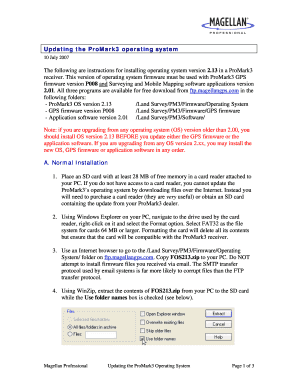
Updating the ProMark3 operating system 10 July 2007 The following are instructions for installing operating system version 2.13 in a ProMark3 receiver. This version of operating system firmware must.

How it works

  1. Open form

    Open form follow the instructions

  2. Easily sign form

    Easily sign the form with your finger

  3. Share form

    Send filled & signed form or save

How to fill out the updating the ProMark3 operating system online

This guide provides clear and comprehensive instructions on how to fill out the updating the ProMark3 operating system online. Follow these steps to ensure a smooth installation process and successful update of the operating system.

Follow the steps to successfully update the ProMark3 operating system.

  1. Click ‘Get Form’ button to obtain the form and open it in the editor.
  2. Ensure you have an SD card with at least 28 MB of free memory. If you do not have a card reader, you will need to purchase one or acquire an SD card containing the update from your ProMark3 dealer.
  3. Use Windows Explorer to navigate to the drive of your card reader, right-click on it, and select the 'Format' option. Choose FAT32 file system for cards 64 MB or larger to ensure compatibility.
  4. Access the internet browser and go to the folder on ftp.magellangps.com named '/Land Survey/PM3/Firmware/Operating System/'. Download 'FOS213.zip' to your PC, avoiding any firmware files sent via email.
  5. Utilize WinZip to extract the contents of 'FOS213.zip' to your SD card, ensuring the 'Use folder names' box remains checked.
  6. Confirm the extracted files by browsing the SD card in Windows Explorer. Ensure 'FOS213.txt' is in the top directory and 'NK.nbX' is in a subdirectory named 'FOS213'.
  7. Power off the ProMark3, insert the SD card, and then turn it back on by pressing the power button until the power LED activates.
  8. Connect to external power or ensure that the battery has at least 50% charge. Verify the battery level by double-tapping 'Settings' and selecting the power icon.
  9. Access the Utilities icon on the ProMark3’s desktop, then select 'DGPSConfig'. Choose the 'None' option under the Mode tab and confirm by tapping 'OK'.
  10. Access the AutoLoader icon on the Utilities screen. Highlight 'FOS213.txt' and tap the 'OK' button to initiate the operating system installation.
  11. Once the installation completes, tap 'OK' on the success message. The ProMark3 will reboot and prompt to recalibrate the touch screen.
  12. Take the receiver outside and allow it to track satellites for approximately 10 minutes without logging any data.
  13. Reset the receiver by simultaneously pressing the LOG, IN, and MENU keys. This action will reboot the device.
  14. Recalibrate the touch screen as instructed.
  15. Adjust the keypad brightness to save battery life by navigating to 'Settings > Backlight Control', sliding the Keypad Brightness tab left, and tapping 'OK'.
  16. Initialize the GPS by double-tapping 'Utilities > GPS Init' to set the receiver to your current location.
  17. To utilize different real-time differential corrections, manipulate DGPS configurations by selecting the desired mode in 'DGPSConfig'.
  18. If required, use the rescue image feature by following the outlined steps to reset the ProMark3 and reinstall the operating system.
  19. Upon completion of the update, you can save changes, download, print, or share the form as needed.

Complete the updating process and enhance your ProMark3 experience by filing the necessary documents online.

Get form

Experience a faster way to fill out and sign forms on the web. Access the most extensive library of templates available.
Get form

Related content

U.S. Geological Survey - Global Positioning System...
Feb 25, 2014 — Home page of the USGS Global Positioning System (GPS) Committee....
Learn more
The Complete System The Ashtech® ProMark2™...
high-precision GPS survey system. ... system! ProMark2 is a must-have addition to any...
Learn more
TRIMBLE EUROPE 802111A MobileMapper 100, ProMark...
Using Windows Mobile 6.5 The operating system used in the receiver is the ... If you are...
Learn more

Related links form

CT K-93 2016 CT K-9A 2015 CT K-9B 2015 CT L-4 2001

Questions & Answers

Get answers to your most pressing questions about US Legal Forms API.

Contact support

The proxmark3 is a powerful general purpose RFID tool, the size of a deck of cards, designed to snoop, listen and emulate everything from Low Frequency (125kHz) to High Frequency (13.56MHz) tags.

How to Update Your Router Type your routers IP address into the search bar of any web browser. ... Enter your username and password. ... Locate the Firmware or Update section. ... Go to your router manufacturer's website. ... Download the firmware update file. ... Extract the file and move it to your desktop.

Download the zipped firmware file to your hard drive and extract the . FIR firmware update file. Copy the extracted . FIR file to the root directory of a CF memory card by inserting the card into a card reader and dragging/dropping the file to the card.

0:45 6:16 How to Update Canon Camera Firmware - YouTube YouTube Start of suggested clip End of suggested clip And that should bring us right to our yes. So if i show you the website. Here. We basicallyMoreAnd that should bring us right to our yes. So if i show you the website. Here. We basically navigated to the canon r6 which is the camera that i'm going to be updating. Today.

Turn the camera's power on and set the shooting mode to <P> mode. Press the <Menu> button to display the menu. Check <Firmware Ver.X.X.X> is in the <Set-up> tab in the menu.

Firmware updates generally contain one of two things: Enhancements that improve camera operation (e.g., upgraded autofocus functionality) Fixes for camera problems.

Get This Form Now!

Use professional pre-built templates to fill in and sign documents online faster. Get access to thousands of forms.
Get form
If you believe that this page should be taken down, please follow our DMCA take down processhere.

Industry-leading security and compliance

US Legal Forms protects your data by complying with industry-specific security standards.
  • In businnes since 1997
    25+ years providing professional legal documents.
  • Accredited business
    Guarantees that a business meets BBB accreditation standards in the US and Canada.
  • Secured by Braintree
    Validated Level 1 PCI DSS compliant payment gateway that accepts most major credit and debit card brands from across the globe.
Get Updating The ProMark3 Operating System
Get form
Form Packages
Adoption
Bankruptcy
Contractors
Divorce
Home Sales
Employment
Identity Theft
Incorporation
Landlord Tenant
Living Trust
Name Change
Personal Planning
Small Business
Wills & Estates
Packages A-Z
Form Categories
Affidavits
Bankruptcy
Bill of Sale
Corporate - LLC
Divorce
Employment
Identity Theft
Internet Technology
Landlord Tenant
Living Wills
Name Change
Power of Attorney
Real Estate
Small Estates
Wills
All Forms
Forms A-Z
Form Library
Customer Service
Terms of Service
Privacy Notice
Legal Hub
Content Takedown Policy
Bug Bounty Program
About Us
Blog
Affiliates
Contact Us
Delete My Account
Site Map
Industries
Forms in Spanish
Localized Forms
State-specific Forms
Forms Kit
Legal Guides
Real Estate Handbook
All Guides
Prepared for You
Notarize
Incorporation services
Our Customers
For Consumers
For Small Business
For Attorneys
Our Sites
US Legal Forms
USLegal
FormsPass
pdfFiller
signNow
airSlate WorkFlow
DocHub
Instapage
Social Media
Call us now toll free:
+1 833 426 79 33
As seen in:
  • USA Today logo picture
  • CBC News logo picture
  • LA Times logo picture
  • The Washington Post logo picture
  • AP logo picture
  • Forbes logo picture
© Copyright 1997-2025
airSlate Legal Forms, Inc.
3720 Flowood Dr, Flowood, Mississippi 39232
Form Packages
Adoption
Bankruptcy
Contractors
Divorce
Home Sales
Employment
Identity Theft
Incorporation
Landlord Tenant
Living Trust
Name Change
Personal Planning
Small Business
Wills & Estates
Packages A-Z
Form Categories
Affidavits
Bankruptcy
Bill of Sale
Corporate - LLC
Divorce
Employment
Identity Theft
Internet Technology
Landlord Tenant
Living Wills
Name Change
Power of Attorney
Real Estate
Small Estates
Wills
All Forms
Forms A-Z
Form Library
Customer Service
Terms of Service
Privacy Notice
Legal Hub
Content Takedown Policy
Bug Bounty Program
About Us
Blog
Affiliates
Contact Us
Delete My Account
Site Map
Industries
Forms in Spanish
Localized Forms
State-specific Forms
Forms Kit
Legal Guides
Real Estate Handbook
All Guides
Prepared for You
Notarize
Incorporation services
Our Customers
For Consumers
For Small Business
For Attorneys
Our Sites
US Legal Forms
USLegal
FormsPass
pdfFiller
signNow
airSlate WorkFlow
DocHub
Instapage
Social Media
Call us now toll free:
+1 833 426 79 33
As seen in:
  • USA Today logo picture
  • CBC News logo picture
  • LA Times logo picture
  • The Washington Post logo picture
  • AP logo picture
  • Forbes logo picture
© Copyright 1997-2025
airSlate Legal Forms, Inc.
3720 Flowood Dr, Flowood, Mississippi 39232