We use cookies to improve security, personalize the user experience, enhance our marketing activities (including cooperating with our marketing partners) and for other business use.
Click "here" to read our Cookie Policy. By clicking "Accept" you agree to the use of cookies. Read less
Read more
Accept
Loading
Form preview
  • US Legal Forms
  • Form Library
  • More Forms
  • More Uncategorized Forms
  • Access Codes Form - City Of Mississauga - Mississauga

Get Access Codes Form - City Of Mississauga - Mississauga

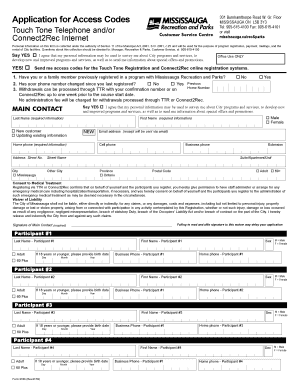
Application for Access Codes Touch Tone Telephone and/or Connect2Rec Internet Customer Service Centre 301 Burnhamthorpe Road W. Gr. Floor MISSISSAUGA ON L5B 3Y3 Tel: 905-615-4100 Fax: 905-615-4101.

How it works

  1. Open form

    Open form follow the instructions

  2. Easily sign form

    Easily sign the form with your finger

  3. Share form

    Send filled & signed form or save

How to fill out the Access Codes Form - City Of Mississauga - Mississauga online

Filling out the Access Codes Form for the City of Mississauga online is a straightforward process designed to help users easily register for recreational programs. This guide offers detailed, step-by-step instructions to assist you in completing the form effectively.

Follow the steps to fill out the Access Codes Form online.

  1. Press the ‘Get Form’ button to acquire the form and open it in your editing tool.
  2. Begin by providing your personal information in the required fields. Enter your last name, first name, email address, home phone, and other contact information accurately.
  3. Indicate whether you are a new customer or updating existing information by selecting the appropriate option.
  4. Fill in your address details, including street number, street name, city, province, and postal code. Ensure this information is up-to-date.
  5. Consenting to medical treatment is important. Read the statement and confirm your agreement by checking the appropriate box.
  6. Complete the waiver of liability section by reading the terms carefully. Provide your signature in the designated area, ensuring it is completed accurately.
  7. For each participant, input the required information, including their last name, first name, age category, birth date, and contact information. Repeat this step for up to four participants.
  8. Review your form for accuracy, ensuring all required fields are completed. This includes re-checking consent and waiver sections.
  9. Once you have verified that all information is correct, you can save the changes, download the completed form, print it, or share it as needed.

Get started on completing your Access Codes Form online today!

Get form

Experience a faster way to fill out and sign forms on the web. Access the most extensive library of templates available.
Get form

Related content

BEGIN PRIVACY-ENHANCED MESSAGE----- Proc-Type ...
... ARGENTIA RD STE 200 STREET 2: CANADA L5N 2X4 CITY: MISSISSAUGA STATE: ... 2121...
Learn more
Community Partner Registration | Centre for...
Address (Street, City, Postal Code) * ... feel University of Toronto Mississauga student...
Learn more
Toronto - Wikipedia
Toronto is the capital city of the Canadian province of Ontario. With a recorded...
Learn more

Related links form

CT B-58 IND 2016 CT B-58 ORG 2016 CT B-6 2012 CT B-88 2001

Questions & Answers

Get answers to your most pressing questions about US Legal Forms API.

Contact support

You can contact the City of Mississauga through their official website, where you will find various contact options including phone numbers and email addresses. For specific inquiries related to the Access Codes Form - City Of Mississauga - Mississauga, refer to the relevant department’s contact information. Utilizing these resources will connect you directly with the appropriate representatives.

To withdraw an active request in Mississauga, you must submit a written notice indicating your intention to withdraw. Include your details and reference the Access Codes Form - City Of Mississauga - Mississauga in your notice for clarity. This ensures your request is officially canceled without any confusion. Contacting the relevant department directly can also help streamline this process.

The email format for the City of Mississauga typically includes the city’s official domain. For most inquiries, you can use a structure like firstname.lastname@mississauga.ca. If you need to contact a specific department, check the city’s website for the exact email address. Using the correct email format helps ensure your communication reaches the right person.

Filing a freedom of information request in Ontario involves using the Access Codes Form - City Of Mississauga - Mississauga. You should complete the form and ensure you provide any specific details related to your request. After submitting the form, you will receive notifications regarding the status of your request. This approach streamlines your access to public information in Ontario.

In Mississauga, CA, you can submit a freedom of information request by using the Access Codes Form - City Of Mississauga - Mississauga. Fill out the form with accurate information and submit it via the city’s official portal or mail it to the appropriate department. This ensures that your request is processed in a timely manner, allowing you to obtain the necessary information.

To submit a freedom of information request, you need to fill out the Access Codes Form - City Of Mississauga - Mississauga. Ensure that you provide all required details to facilitate a prompt response. After completing the form, submit it through the designated channels outlined on the city’s website. This process helps you access the information you need efficiently.

Is it a Non-Emergency Concern? Who to Call. Contact one of the Toronto Building District Inspection Offices. The inspector will need the address of the property and details of your concern. ... Toronto and East York District: 416-338-0700. North York District: 416-338-0700. Etobicoke York District: ... Scarborough District:

To report work being done without a permit, first check the property information. If there is no permit, then call 905-615-4311. These guides might address some of your concerns about ongoing construction.

Create an ePlans account. Start the building permit application process by creating an ePlans account. Submit a building permit application. ... Upload drawings and supporting documents. ... Prescreen review. ... Fee payment. ... Your application is created. ... Department review. ... Permit issued.

These are the average times for processing and issuing a permit: New residential (detached, semi) – 13 weeks. Residential alteration (detached, semi) – 7 weeks. Second unit – 10 weeks.

Get This Form Now!

Use professional pre-built templates to fill in and sign documents online faster. Get access to thousands of forms.
Get form
If you believe that this page should be taken down, please follow our DMCA take down processhere.

Industry-leading security and compliance

US Legal Forms protects your data by complying with industry-specific security standards.
  • In businnes since 1997
    25+ years providing professional legal documents.
  • Accredited business
    Guarantees that a business meets BBB accreditation standards in the US and Canada.
  • Secured by Braintree
    Validated Level 1 PCI DSS compliant payment gateway that accepts most major credit and debit card brands from across the globe.
Get Access Codes Form - City Of Mississauga - Mississauga
Get form
Form Packages
Adoption
Bankruptcy
Contractors
Divorce
Home Sales
Employment
Identity Theft
Incorporation
Landlord Tenant
Living Trust
Name Change
Personal Planning
Small Business
Wills & Estates
Packages A-Z
Form Categories
Affidavits
Bankruptcy
Bill of Sale
Corporate - LLC
Divorce
Employment
Identity Theft
Internet Technology
Landlord Tenant
Living Wills
Name Change
Power of Attorney
Real Estate
Small Estates
Wills
All Forms
Forms A-Z
Form Library
Customer Service
Terms of Service
Privacy Notice
Legal Hub
Content Takedown Policy
Bug Bounty Program
About Us
Help Portal
Legal Resources
Blog
Affiliates
Contact Us
Delete My Account
Site Map
Industries
Forms in Spanish
Localized Forms
State-specific Forms
Forms Kit
Legal Guides
Real Estate Handbook
All Guides
Prepared for You
Notarize
Incorporation services
Our Customers
For Consumers
For Small Business
For Attorneys
Our Sites
US Legal Forms
USLegal
FormsPass
pdfFiller
signNow
airSlate WorkFlow
DocHub
Instapage
Social Media
Call us now toll free:
+1 833 426 79 33
As seen in:
  • USA Today logo picture
  • CBC News logo picture
  • LA Times logo picture
  • The Washington Post logo picture
  • AP logo picture
  • Forbes logo picture
© Copyright 1997-2025
airSlate Legal Forms, Inc.
3720 Flowood Dr, Flowood, Mississippi 39232
Form Packages
Adoption
Bankruptcy
Contractors
Divorce
Home Sales
Employment
Identity Theft
Incorporation
Landlord Tenant
Living Trust
Name Change
Personal Planning
Small Business
Wills & Estates
Packages A-Z
Form Categories
Affidavits
Bankruptcy
Bill of Sale
Corporate - LLC
Divorce
Employment
Identity Theft
Internet Technology
Landlord Tenant
Living Wills
Name Change
Power of Attorney
Real Estate
Small Estates
Wills
All Forms
Forms A-Z
Form Library
Customer Service
Terms of Service
Privacy Notice
Legal Hub
Content Takedown Policy
Bug Bounty Program
About Us
Help Portal
Legal Resources
Blog
Affiliates
Contact Us
Delete My Account
Site Map
Industries
Forms in Spanish
Localized Forms
State-specific Forms
Forms Kit
Legal Guides
Real Estate Handbook
All Guides
Prepared for You
Notarize
Incorporation services
Our Customers
For Consumers
For Small Business
For Attorneys
Our Sites
US Legal Forms
USLegal
FormsPass
pdfFiller
signNow
airSlate WorkFlow
DocHub
Instapage
Social Media
Call us now toll free:
+1 833 426 79 33
As seen in:
  • USA Today logo picture
  • CBC News logo picture
  • LA Times logo picture
  • The Washington Post logo picture
  • AP logo picture
  • Forbes logo picture
© Copyright 1997-2025
airSlate Legal Forms, Inc.
3720 Flowood Dr, Flowood, Mississippi 39232