Loading
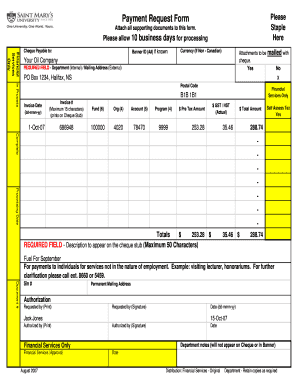
Get Payment Request Form - Sample 2007-08 - Smu
How it works
-

Open form follow the instructions
-

Easily sign the form with your finger
-

Send filled & signed form or save
How to fill out the Payment Request Form - Sample 2007-08 - Smu online
This guide provides comprehensive instructions for completing the Payment Request Form - Sample 2007-08 - Smu. It aims to support users in filling out the form accurately and efficiently online.
Follow the steps to complete the Payment Request Form online.
- Press the 'Get Form' button to retrieve the Payment Request Form and open it for editing.
- In the 'Cheque Payable to' field, enter the name of the entity or person to whom the cheque should be issued.
- Fill in your Banner ID (A#) if known; this helps in identifying your records more efficiently.
- If applicable, select the currency for the cheque if it is not in Canadian dollars.
- In the 'Attachments' section, indicate whether you have included all supporting documents: check 'Yes' or 'No' as appropriate.
- Complete the 'Department (Internal) / Mailing Address (External)' field with the appropriate address for correspondence.
- Enter the invoice date in the format dd-mmm-yy along with the invoice number, ensuring it does not exceed 15 characters.
- Provide the necessary information for Fund, Org, Account, and Program with their respective character limits.
- Input the pre-tax amount, GST/HST, and total amount, ensuring all calculations are accurate.
- Write a description, up to 50 characters, that will appear on the cheque stub to clarify the purpose of the payment.
- If the payment is for services not in the nature of employment, add relevant information in the designated area about the individual or entity providing the service.
- Include the requested by signature and print the name, ensuring to date the request appropriately.
- Obtain authorization signatures as required, and include the relevant dates.
- Final review: ensure all required fields are filled out correctly before proceeding to save, download, print, or share the completed form.
Start filling out your Payment Request Form online today for a seamless processing experience.
An invoice is a formal request for payment, typically sent after goods or services have been delivered. In contrast, a payment request form, such as the Payment Request Form - Sample 2007-08 - Smu, is often used to request advance payments or reimbursements. Understanding this difference helps ensure you use the correct document for your financial needs.
Industry-leading security and compliance
US Legal Forms protects your data by complying with industry-specific security standards.
-
In businnes since 199725+ years providing professional legal documents.
-
Accredited businessGuarantees that a business meets BBB accreditation standards in the US and Canada.
-
Secured by BraintreeValidated Level 1 PCI DSS compliant payment gateway that accepts most major credit and debit card brands from across the globe.