Loading
Get Form 33 Bc Supreme Court
How it works
-

Open form follow the instructions
-

Easily sign the form with your finger
-

Send filled & signed form or save
How to fill out the Form 33 Bc Supreme Court online
Completing the Form 33 Bc Supreme Court online is a crucial step in the legal process for responding to an application. This guide outlines how to accurately fill out the form, ensuring that you provide all necessary information in a clear and organized manner.
Follow the steps to complete the Form 33 Bc Supreme Court online.
- Click 'Get Form' button to obtain the form and open it in the editor.
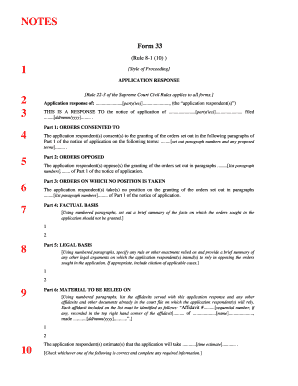
- Identify the style of proceeding at the top of the form. This includes inserting your case number, registry location (e.g., Vancouver), and the names of the parties involved in capital letters.
- In the section labeled 'Application response of,' insert your name as the application respondent.
- Respond to the notice of application by inserting the name of the party making the application to the court and the date the notice was filed.
- In Part 1, specify which orders you consent to by listing the relevant numbered paragraphs from the notice of application along with any proposed terms.
- In Part 2, indicate which orders you oppose by listing the corresponding paragraph numbers from the notice.
- Use Part 3 to capture any orders on which you take no position by listing the associated paragraph numbers.
- In Part 4, provide a summary of the facts supporting your opposition. Use numbered paragraphs for clarity.
- In Part 5, outline the legal basis for your opposition, specifying any rules or enactments relied upon and including relevant case citations.
- In Part 6, list the affidavits and other materials you plan to rely upon in support of your application response, noting each by its sequential number and name of the individual involved.
- Estimate the time required for the application process and check the appropriate box regarding address for service.
- Finally, date your application response, sign it, and print your name below your signature.
- After filling out the form, save your changes. You can then download it, print it, or share it as needed for filing.
Complete the Form 33 Bc Supreme Court online today to facilitate your legal process.
To respond to a statement of claim, first read the document carefully to understand the allegations. Then, draft your response, clearly stating your position and providing any necessary evidence. The Form 33 Bc Supreme Court can guide you through the response process, ensuring that your submission is both accurate and timely.