Loading
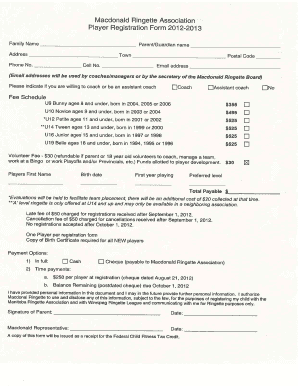
Get Macdonald Ringette Association Player Registration Form 201 2-201 G
How it works
-

Open form follow the instructions
-

Easily sign the form with your finger
-

Send filled & signed form or save
How to fill out the Macdonald Ringette Association Player Registration Form 201 2-201 G online
Completing the Macdonald Ringette Association Player Registration Form 201 2-201 G online is a straightforward process. This guide provides step-by-step instructions to ensure you accurately fill out the required fields and provide the necessary information for your player’s registration.
Follow the steps to successfully complete the registration form.
- Press the 'Get Form' button to access the registration form and open it in the online editor.
- Begin by entering the family name in the designated field. Ensure that it reflects the correct spelling as it appears on official documents.
- Fill in the parent or guardian's name, providing their first and last name.
- Enter the full address, including street, town, and postal code. Make sure to verify the accuracy of the entered details.
- Provide a phone number and, if applicable, a cell number, for communication purposes.
- Input the email address, as it will be used by coaches and managers for communication regarding team activities.
- Indicate if you are willing to take on a coaching role by selecting either the 'Coach' or 'Assistant Coach' checkbox.
- Review the fee schedule for registration based on the player's age group and select the appropriate fee. Enter the total payable amount.
- Fill in the player's first name, birth date, and indicate if this is their first year playing,
- Select the preferred level of play for your player, based on the provided age categories.
- Acknowledge any additional costs such as evaluation fees or late registration fees, and ensure you understand the cancellation policy.
- Provide your signature and date to authorize the use of supplied personal information for registration purposes.
- Make sure to upload a copy of the player’s birth certificate if they are a new player.
- Review all entered information for accuracy, then choose to save changes, download, print, or share the completed form as needed.
Complete your player registration form online today to secure your spot in the season.
Unfortunately, there's no way to set an iPhone text signature in its built-in Message app. Most third-party applications from the App Store claim they can add signatures, and there're available tweaks for jail broken iPhones that can add the signature on text feature – but we would not recommend any of these solutions.
Industry-leading security and compliance
US Legal Forms protects your data by complying with industry-specific security standards.
-
In businnes since 199725+ years providing professional legal documents.
-
Accredited businessGuarantees that a business meets BBB accreditation standards in the US and Canada.
-
Secured by BraintreeValidated Level 1 PCI DSS compliant payment gateway that accepts most major credit and debit card brands from across the globe.