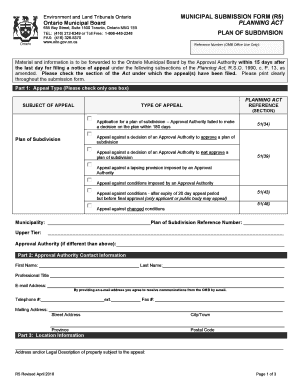
Get Municipal Submission Form (r5) Planning Act Plan Of ... - Omb Gov On
How it works
-

Open form follow the instructions
-

Easily sign the form with your finger
-

Send filled & signed form or save
How to fill out the MUNICIPAL SUBMISSION FORM (R5) PLANNING ACT online
This guide provides detailed instructions for completing the Municipal Submission Form (R5) related to the Planning Act. Whether you are a first-time user or looking to refresh your knowledge, this step-by-step process will help you successfully navigate the online form.
Follow the steps to fill out the form online.
- Select the ‘Get Form’ button to access the Municipal Submission Form (R5) and open it for editing.
- Begin with Part 1: Appeal Type. Here, check the box that corresponds to your specific type of appeal regarding the plan of subdivision. This ensures the correct procedure is followed based on your situation.
- In Part 2: Approval Authority Contact Information, fill in the required fields with the details of the person responsible for the approval. Ensure the email address is accurate for communication purposes.
- Proceed to Part 3: Location Information. Provide the address and/or legal description of the property involved in your appeal to clearly establish its identity.
- Next, in Part 4: Related Matters, disclose any official plan appeals or zoning by-law appeals associated with your submission, alongside their respective O.M.B. file numbers.
- In Part 5: Plan of Subdivision Information, indicate the date the application was submitted to the municipality and provide a concise summary of the plan's purpose and any issues pertinent to the appeal.
- For Part 6: Scheduling Information, estimate the number of days required for the hearing and the expected number of witnesses. Include their areas of expertise.
- Moving to Part 7: Approval Authority Representative Information, complete this section with the details of the representative who will attend the OMB hearing.
- In Part 8: Required Documentation, confirm that you have attached all necessary documentation as specified. This ensures your submission is complete and complies with requirements.
- Finally, review the completed form for accuracy and clarity. Once satisfied, save your changes. You can also download, print, or share the form as needed.
Begin completing your Municipal Submission Form (R5) online today!
Yes, you can submit a planning application on a property you don’t own, but you must have the property owner's permission. This includes completing the MUNICIPAL SUBMISSION FORM (R5) PLANNING ACT PLAN OF ... - Omb Gov On, where you will need to indicate that you have consent. This scenario often occurs with developers or agents acting on behalf of the owner. Always ensure proper communication with the property owner to avoid complications during the planning process.
Industry-leading security and compliance
-
In businnes since 199725+ years providing professional legal documents.
-
Accredited businessGuarantees that a business meets BBB accreditation standards in the US and Canada.
-
Secured by BraintreeValidated Level 1 PCI DSS compliant payment gateway that accepts most major credit and debit card brands from across the globe.