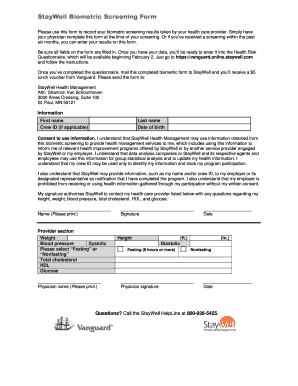
StayWell Biometric Screening Form Please use this form to record your biometric screening results taken by your health care provider. Simply have your physician complete this form at the time of your.
Loading
Open form follow the instructions
Easily sign the form with your finger
Send filled & signed form or save
How to fill out the Staywell Vanguard Form online
The Staywell Vanguard Form is essential for recording your biometric screening results conducted by a health care provider. This comprehensive guide will help you easily navigate each section of the form and ensure all necessary information is accurately filled out.
Follow the steps to complete the Staywell Vanguard Form efficiently.
- Click the ‘Get Form’ button to access the Staywell Vanguard Form. This will open the document in the designated platform for completion.
- Begin by entering your personal information. Fill in your first name, last name, and date of birth in the appropriate fields.
- If applicable, provide your Crew ID. This identifier helps to streamline your health information management.
- Read and understand the consent section that explains how your biometric information will be used. Ensure you agree to the terms before proceeding.
- Have your health care provider complete the provider section by entering your biometric screening results, including weight, blood pressure (systolic and diastolic), total cholesterol, HDL, and glucose levels. They should also specify whether the test was performed while fasting or non-fasting.
- Ensure your provider signs and dates the form, confirming the information provided. This is crucial for the form's validity.
- After all fields are filled out, review the form for accuracy. Once confirmed, you can save the final changes, download the document, print it, or share it as necessary.
Complete the Staywell Vanguard Form online today to ensure you take advantage of health management services and benefits.
Experience a faster way to fill out and sign forms on the web. Access the most extensive library of templates available.
Related content
Jan 1, 2020 — Review your eligibility form from orientation for effective dates of...
Nov 17, 2015 — TIAA-CREF and Vanguard, Penn's retirement investment providers, offer...
fluid can form ice on the windshield, blocking your ... Redistributions in binary form...
Get answers to your most pressing questions about US Legal Forms API.
How do I send documents to Vanguard?
To send documents to Vanguard, you can utilize the Staywell Vanguard Form, which simplifies the submission process. First, complete the form with the necessary details and ensure all required documents are attached. You can then send these documents via secure upload through Vanguard's online portal or by mailing them directly to their designated address. This streamlined approach helps ensure that your documents reach Vanguard safely and promptly.
How do I submit forms to Vanguard?
You can submit forms to Vanguard by first ensuring you have filled out the Staywell Vanguard Form completely and correctly. After filling out the form, you can either mail it to the address provided on the form or submit it electronically through Vanguard's online portal, if applicable. Vanguard's website offers detailed instructions on the submission process, ensuring you have a seamless experience. If you need assistance, consider reaching out to their support team for guidance.
How do I report a death to Vanguard?
To report a death to Vanguard, start by gathering the necessary documentation, such as the death certificate and any relevant account information. You can contact Vanguard's customer service directly or visit their website for specific instructions on handling the Staywell Vanguard Form. Completing this form accurately will help ensure a smooth process in managing the deceased's accounts. It's important to follow the guidelines provided to avoid any delays.
How long does it take to get a distribution check from Vanguard?
Please allow 5-7 business days for processing after we receive your form. Use this form to move assets between two Vanguard accounts as a distribution, direct rollover, or indirect rollover.
How long does it take to transfer money from Vanguard to bank account?
It'll take approximately 5-10 minutes to complete an online transfer request. Most transfers take as little as 5 to 7 days. If paperwork is required, the transfer may take longer. Vanguard will keep you updated throughout the transfer process.
How long does it take for a 401k withdrawal to be direct deposited?
All distribution requests are sent for approval -- this action is typically completed by your Employer. Once the distribution is reviewed and approved, the payment will be processed. Payments are generally received within 7-10 business days for a check; 5-7 business days for direct deposit (if available).
How do I grant access to my Vanguard account?
Here's how to grant Information Only or Limited Authority permission online: After logging in to Vanguard, click on “Profile & account settings” at the top. Then click on the Security tab and “Account permissions.” The grantee must also have a Vanguard account.
How do I get Vanguard paper Forms?
To request a Prospectus for a Non Vanguard Mutual Fund or ETF by mail, please contact us at 1-800-VANGUARD. Use this online process to maintain or establish our Required Minimum Distribution Service on your retirement account.
How long does it take for Vanguard to process 401k withdrawal?
When you withdraw cash it can take up to 5 business days to be paid to your bank account.
Does Vanguard accept power of attorney?
Many have their own authorizations for the accounts at the financial institution. For example, Vanguard will accept an attorney- drafted POA, but for our clients' convenience we offer our Vanguard Agent Authorization.
Use professional pre-built templates to fill in and sign documents online faster. Get access to thousands of forms.
If you believe that this page should be taken down, please follow our DMCA take down process here.