Loading
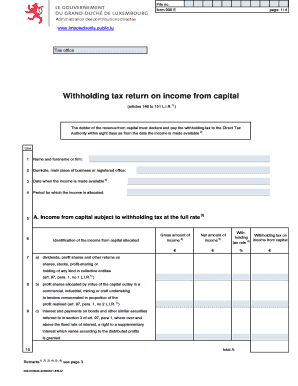
Get Form 900 E Page: 1/ 4 Administration Des Contributions Directes Www
How it works
-

Open form follow the instructions
-

Easily sign the form with your finger
-

Send filled & signed form or save
How to fill out the Form 900 E Page: 1/ 4 Administration Des Contributions Directes Www online
Filling out Form 900 E is a crucial step in declaring and paying withholding tax on income from capital. This guide provides you with a clear, step-by-step approach to ensure you complete the form accurately and efficiently.
Follow the steps to fill out the form successfully.
- Press the ‘Get Form’ button to obtain the form and open it in your preferred editor.
- Complete the first section by entering the required information, including your name or firm’s name in line 1, your domicile or main place of business in line 2, and the date when the income is made available in line 3.
- Specify the period for which the income is allocated in line 4.
- Fill in section A, where you will list various types of income from capital subject to the full withholding tax rate. For each type listed, enter the gross amount, net amount, and the withholding tax rate as applicable.
- Continue to section B to declare any income from capital that is subject to a reduced withholding tax rate. Provide the necessary details, including the name and address of the beneficiary, gross amount, net amount, and applicable tax rates.
- If applicable, fill in section C for income from capital that is exempt from withholding tax, providing details about the shareholding and other relevant information.
- Complete section D by providing your file number and total amounts for withholding tax as calculated from sections A and B, alongside the date of availability and confirmation of payment.
- Certify the declaration's accuracy by signing it with your name and date.
- Finally, save your changes, and you may download, print, or share the form as needed.
Complete your documents online for a seamless filing experience.
To enable app icon badge, simply go to [Settings] > [Notification/Status Bar] > [Manage Notifications]. Then tap the preferred app > [Show Home Screen Icon Badge], and choose [Dot Badge/Numbered Badge].
Industry-leading security and compliance
US Legal Forms protects your data by complying with industry-specific security standards.
-
In businnes since 199725+ years providing professional legal documents.
-
Accredited businessGuarantees that a business meets BBB accreditation standards in the US and Canada.
-
Secured by BraintreeValidated Level 1 PCI DSS compliant payment gateway that accepts most major credit and debit card brands from across the globe.