Loading
Form preview
  • US Legal Forms
  • Form Library
  • More Forms
  • More Uncategorized Forms
  • Citibank Online Philippines Form

Get Citibank Online Philippines Form

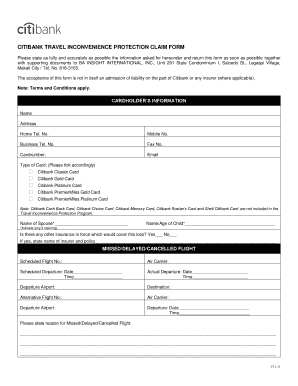
Documents to BA INSIGHT INTERNATIONAL, INC., Unit 201 State Condominium I, Salcedo St., Legaspi Village, Makati City / Tel. No. 818-3155. The acceptance of this form is not in itself an admission of liability on the part of Citibank or any insurer (where applicable). Note: Terms and Conditions apply. CARDHOLDER S INFORMATION Name Address Home Tel. No. Mobile No. Business Tel. No. Fax No. Cardnumber: Email Type of Card: (Please tick accordingly) Citibank Classic Card Citibank Gold Card.

How it works

  1. Open form

    Open form follow the instructions

  2. Easily sign form

    Easily sign the form with your finger

  3. Share form

    Send filled & signed form or save

How to fill out the Citibank Online Philippines Form online

This guide provides step-by-step instructions for filling out the Citibank Online Philippines Form. It aims to assist users in accurately completing the necessary fields to submit their claims effectively.

Follow the steps to complete your form successfully.

  1. Click the ‘Get Form’ button to obtain a copy of the Citibank Online Philippines Form and open it in your preferred editing tool.
  2. Begin by entering the cardholder’s information. Provide your full name, address, home telephone number, mobile number, business telephone number, fax number, card number, and email address in the respective fields.
  3. Indicate the type of Citibank card you are claiming under by selecting the appropriate option from the list provided.
  4. If applicable, fill in the name of your spouse and name/age of any children for whom you are making a claim.
  5. Answer whether you have any other insurance that could cover the loss. If yes, provide the name of the insurer and policy details.
  6. For missed, delayed, or canceled flights, complete the scheduled flight number, the name of the air carrier, and the dates and times for both scheduled and actual departures.
  7. State the reason for the missed, delayed, or canceled flight in the designated space.
  8. If your luggage was delayed or lost, provide the required details such as flight information, arrival times, and claim details for the luggage.
  9. Ensure that you check off the box next to each required supporting document you are submitting with the form.
  10. Finally, review all the information you have entered for accuracy, then sign and date the form in the designated area before submitting it.
  11. Once completed, save your changes, and choose to download, print, or share the form as needed.

Take action now and complete your Citibank Online Philippines Form online for a smoother claims process.

Get form

Experience a faster way to fill out and sign forms on the web. Access the most extensive library of templates available.
Get form

Related content

Dispute Form
Citi and Arc Design and Citibank are registered service marks of Citigroup Inc. 1043972...
Learn more
Transfer transaction form for travel accounts...
... citibank online agreement for online funds transfers, citibank philippines, transfer...
Learn more
ING Group - Wikipedia
The ING Group (Dutch: ING Groep) is a Dutch multinational banking and financial services...
Learn more

Related links form

Duregger Shipper Credit Application & Profile Form ESTES Presentation of Loss and Damage Claims FedEx Benefits Domestic Partner Affidavit 2004 FedEx Billable Stamp Agreement and Order Form 2010

Questions & Answers

Get answers to your most pressing questions about US Legal Forms API.

Contact support

Yes, you can access your Citibank account from overseas. With the right setup, including the Citibank Online Philippines Form, you can manage your finances anytime and anywhere. Just ensure you have a secure internet connection to log in and perform transactions without issues.

Yes, it is important to notify Citibank of your international travel plans. This notification helps prevent potential blocks on your account while you are abroad. You can easily inform them through the Citibank Online Philippines Form, ensuring your banking experience remains smooth during your travels.

To activate Citibank overseas usage, you can log into your account online. Navigate to the settings or account preferences section, where you will find an option for international usage. Follow the prompts to enable this feature and ensure your Citibank Online Philippines Form is up to date for seamless transactions abroad.

Citibank account holders in the Philippines will see their accounts transitioned to UnionBank. This transition aims to provide enhanced banking services and support. If you have questions about your account or need to complete the Citibank Online Philippines Form, UnionBank's customer support is ready to help.

Citibank credit cards in the Philippines will continue to function under UnionBank. Existing cardholders will receive information about any changes or new features available to them. If you require specific forms or need to update your information, the Citibank Online Philippines Form is available for your convenience.

Citibank's consumer banking operations have transitioned to UnionBank, effectively making them part of UnionBank's services. Customers can expect a variety of banking options under this new arrangement. If you have any queries regarding the transition or need to fill out the Citibank Online Philippines Form, UnionBank’s customer service can assist you.

Yes, Citibank is still operating in the Philippines, but its consumer banking business has transitioned to UnionBank. This change allows customers to benefit from enhanced services and offerings. For further details or to fill out the Citibank Online Philippines Form, check the UnionBank website.

To open a Citibank account abroad, you typically need to visit a local Citibank branch in the country you are in. You may also be required to complete the Citibank Online Philippines Form if the bank offers that option in your location. Be sure to bring the necessary identification and documents for a smooth account opening process.

Yes, you can use your Citibank account while traveling or living overseas. Citibank provides global access to your funds, making it convenient for international transactions. If you need assistance with your account or the Citibank Online Philippines Form, consider visiting the support section on their website.

You can apply for Citibank services online, including various banking accounts. The process is straightforward, allowing you to complete the Citibank Online Philippines Form from the comfort of your home. Ensure you have all necessary documents ready to streamline your application.

Get This Form Now!

Use professional pre-built templates to fill in and sign documents online faster. Get access to thousands of forms.
Get form
If you believe that this page should be taken down, please follow our DMCA take down processhere.
Get Citibank Online Philippines Form
Get form
  • Adoption
  • Bankruptcy
  • Contractors
  • Divorce
  • Home Sales
  • Employment
  • Identity Theft
  • Incorporation
  • Landlord Tenant
  • Living Trust
  • Name Change
  • Personal Planning
  • Small Business
  • Wills & Estates
  • Packages A-Z
  • Affidavits
  • Bankruptcy
  • Bill of Sale
  • Corporate - LLC
  • Divorce
  • Employment
  • Identity Theft
  • Internet Technology
  • Landlord Tenant
  • Living Wills
  • Name Change
  • Power of Attorney
  • Real Estate
  • Small Estates
  • Wills
  • All Forms
  • Forms A-Z
  • Form Library
  • Legal Hub
  • About Us
  • Help Portal
  • Legal Resources
  • Blog
  • Affiliates
  • Contact Us
  • Delete My Account
  • Site Map
  • Industries
  • Forms in Spanish
  • Localized Forms
  • State-specific Forms
  • Forms Kit
  • Real Estate Handbook
  • All Guides
  • Notarize
  • Incorporation services
  • For Consumers
  • For Small Business
  • For Attorneys
  • USLegal
  • FormsPass
  • pdfFiller
  • signNow
  • altaFlow
  • DocHub
  • Instapage
Form Packages
  • Adoption
  • Bankruptcy
  • Contractors
  • Divorce
  • Home Sales
  • Employment
  • Identity Theft
  • Incorporation
  • Landlord Tenant
  • Living Trust
  • Name Change
  • Personal Planning
  • Small Business
  • Wills & Estates
  • Packages A-Z
Form Categories
  • Affidavits
  • Bankruptcy
  • Bill of Sale
  • Corporate - LLC
  • Divorce
  • Employment
  • Identity Theft
  • Internet Technology
  • Landlord Tenant
  • Living Wills
  • Name Change
  • Power of Attorney
  • Real Estate
  • Small Estates
  • Wills
  • All Forms
  • Forms A-Z
  • Form Library
Customer Service
  • Legal Hub
  • About Us
  • Help Portal
  • Legal Resources
  • Blog
  • Affiliates
  • Contact Us
  • Delete My Account
  • Site Map
  • Industries
  • Forms in Spanish
  • Localized Forms
  • State-specific Forms
  • Forms Kit
Legal Guides
  • Real Estate Handbook
  • All Guides
Prepared for you
  • Notarize
  • Incorporation services
Our Customers
  • For Consumers
  • For Small Business
  • For Attorneys
Our Sites
  • USLegal
  • FormsPass
  • pdfFiller
  • signNow
  • altaFlow
  • DocHub
  • Instapage
Social Media
Call us now toll free:
+1 833 426 79 33
As seen in:
© Copyright 1999-2026 airSlate Legal Forms, Inc. 3720 Flowood Dr, Flowood, Mississippi 39232
  • Your Privacy Choices
  • Terms of Service
  • Privacy Notice
  • Content Takedown Policy
  • Bug Bounty Program