Loading
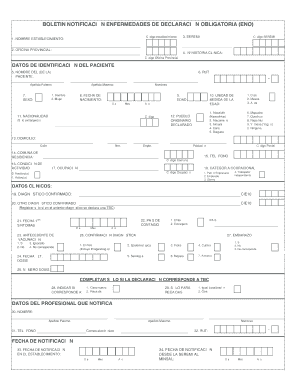
Get Formulario Eno
How it works
-

Open form follow the instructions
-

Easily sign the form with your finger
-

Send filled & signed form or save
How to fill out the Formulario Eno online
The Formulario Eno is crucial for reporting mandatory diseases. This guide will provide you with clear, step-by-step instructions to fill out the form online efficiently and accurately.
Follow the steps to complete the Formulario Eno online seamlessly.
- Click ‘Get Form’ button to obtain the form and open it in the online editor.
- Fill in the establishment name and code. Ensure you provide accurate information as per the list of codes provided by DEIS.
- Indicate the provincial office name and code, if applicable. Refer to the appropriate scale to ensure accuracy.
- Enter the clinical history number of the patient as it appears in the patient's records.
- Provide the patient's name, including last names and first names. Be sure to write legibly.
- Record the patient's RUT, ensuring to include the verification digit in the correct section.
- Select the patient's sex by inputting the corresponding number for male or female.
- Document the patient's date of birth in the dd/mm/yyyy format.
- Details about the patient's age should be numerically inputted.
- Indicate the unit of measurement for age, selecting the correct option based on the patient's age group.
- For foreign patients, indicate their nationality. Refer to the relevant country code if necessary.
- Specify if the patient belongs to any defined indigenous peoples using the designated number.
- Record the complete address of the patient, including street name, number, and any relevant details.
- Provide the name of the municipality where the patient resides. Consult the list of municipalities for accuracy.
- Enter a valid contact phone number for the patient or emergency contact.
- Specify the patient’s activity condition as either active or inactive.
- Document the patient's occupation accurately.
- Record the occupational category number corresponding to the patient’s job title.
- Input the confirmed diagnosis along with the CIE-10 code. Ensure that you register multiple conditions in separate forms as required.
- If applicable, document another confirmed diagnosis only for patients diagnosed with tuberculosis.
- Provide the date of the first symptoms detected.
- Indicate the country of contagion based on the origin of the illness.
- Record any vaccination history as necessary.
- Input the date of the last vaccination dose received.
- Specify the number of doses received for the relevant vaccine.
- Select the confirmation type for the diagnosis based on appropriate criteria.
- Indicate pregnancy status only if it pertains to tuberculosis cases.
- If applicable, indicate whether this is a new case or a relapse.
- For relapses, specify if it involves the same location or another.
- Fill out the notifier professional's details, including full name and RUT.
- Provide contact details for the notifier, including primary phone number.
- Enter the notifier's email address.
- Document the date of notification at the establishment.
- Enter the date of notification from the SEREMI to the Ministry of Health.
- Finally, ensure all information is accurate, then save your changes, download, print, or share the completed form as necessary.
Complete your documents online with ease today!
Yes, you can obtain a tax ID number online. The IRS provides an online application process that allows you to complete Formulario Eno easily. Moreover, US Legal Forms simplifies this process by offering templates and support to help you fill out the necessary forms accurately. This way, you can secure your tax ID efficiently and with minimal stress.