Loading
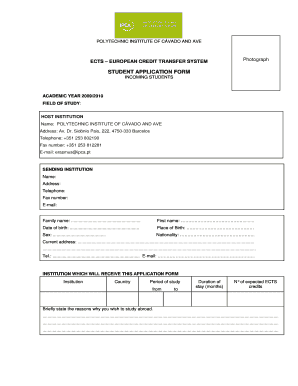
Get Student Application Form - Ipca - Ipca
How it works
-

Open form follow the instructions
-

Easily sign the form with your finger
-

Send filled & signed form or save
How to fill out the STUDENT APPLICATION FORM - IPCA - Ipca online
Filling out the student application form is a crucial step for those wishing to study abroad at the Polytechnic Institute of Cávado and Ave. This guide offers clear, step-by-step instructions to assist you in completing the form efficiently and accurately.
Follow the steps to successfully complete the student application form.
- Press the ‘Get Form’ button to access the form and open it in your chosen editor.
- Fill in your personal data in the designated sections, including your family name, first name, date of birth, place of birth, sex, nationality, current address, telephone number, and email address.
- Enter the sending institution's name, address, telephone number, fax number, and email address.
- Provide details about the institution where you will submit this application form, including the name, country, period of study (from and to), duration of stay in months, and expected number of ECTS credits.
- Briefly state the reasons for wanting to study abroad in the provided section. Take your time to express your motivations clearly.
- In the language competence section, indicate your proficiency in other languages by checking the appropriate boxes regarding your current studies and knowledge levels for each language.
- Complete the section regarding your previous and current study by stating the diploma or degree you are currently pursuing, and indicate whether you have previously studied abroad along with relevant details.
- Sign and date the application form in the designated area to confirm the information provided is accurate.
- Finally, review all filled sections to ensure accuracy. You can save changes, download, print, or share the form as needed before submission.
Complete your student application form online today to embark on your educational journey!
A checkbox (check box, tickbox, tick box) is a graphical widget that allows the user to make a binary choice, i.e. a choice between one of two possible mutually exclusive options. For example, the user may have to answer 'yes' (checked) or 'no' (not checked) on a simple yes/no question.
Industry-leading security and compliance
US Legal Forms protects your data by complying with industry-specific security standards.
-
In businnes since 199725+ years providing professional legal documents.
-
Accredited businessGuarantees that a business meets BBB accreditation standards in the US and Canada.
-
Secured by BraintreeValidated Level 1 PCI DSS compliant payment gateway that accepts most major credit and debit card brands from across the globe.