Loading
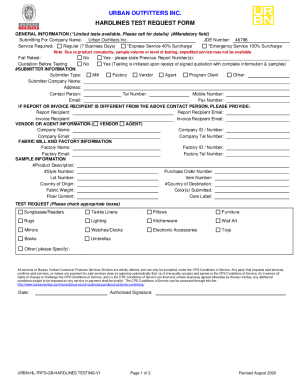
Get Test Request Form Hardlines And Electronic Products - Bureau Veritas
How it works
-

Open form follow the instructions
-

Easily sign the form with your finger
-

Send filled & signed form or save
How to fill out the Test Request Form Hardlines And Electronic Products - Bureau Veritas online
Filling out the Test Request Form for hardlines and electronic products through Bureau Veritas online can be straightforward when you follow the right steps. This guide will offer clear, detailed instructions tailored to your needs.
Follow the steps to complete the Test Request Form effectively.
- Press the ‘Get Form’ button to access the test request form and open it in your editor.
- Complete the 'Submitting For' section, entering the submitter's name, address, phone number, and email address in the appropriate fields. Make sure to include the details for the report recipient as well.
- In the 'Sample Information' section, describe the sample clearly. Enter the SKU/style number, item number, country of distribution, and any relevant lot numbers.
- Select the service required by checking the appropriate box, choosing from options like regular testing or expedited services depending on your urgency.
- In the 'Tests and Other Services' section, check all applicable boxes based on your testing needs, such as full product testing, site inspections, or reliability tests.
- Choose the testing standards or methods applicable to your submission, specifying options such as ASTM, IEC, or CSA. Ensure to also include your client test specifications if applicable.
- Sign and date the form in the 'Authorized Signature' section, confirming your agreement to the conditions of testing outlined by Bureau Veritas.
- Finally, review all the information provided for accuracy and completeness before saving your changes, downloading, printing, or sharing the form as needed.
Complete your Test Request Form online today for efficient testing services!
Mandatory fields are used when information is required in order to submit a form. If the mandatory field is left empty, the system will display this field in red and not allow the form to be published or submitted without that field completed.
Industry-leading security and compliance
US Legal Forms protects your data by complying with industry-specific security standards.
-
In businnes since 199725+ years providing professional legal documents.
-
Accredited businessGuarantees that a business meets BBB accreditation standards in the US and Canada.
-
Secured by BraintreeValidated Level 1 PCI DSS compliant payment gateway that accepts most major credit and debit card brands from across the globe.