Loading
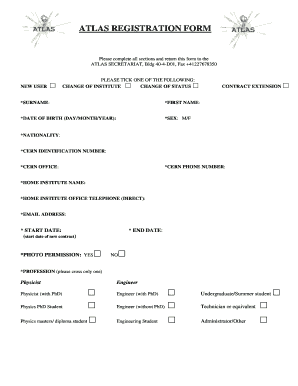
Get Atlas Registration Form
How it works
-

Open form follow the instructions
-

Easily sign the form with your finger
-

Send filled & signed form or save
How to fill out the Atlas Registration Form online
Completing the Atlas Registration Form online is a straightforward process that ensures your information is accurately submitted. This guide will walk you through each section of the form with clear instructions, making it user-friendly for everyone.
Follow the steps to successfully complete the Atlas Registration Form.
- Click ‘Get Form’ button to obtain the form and open it in the editor.
- Indicate your user status by selecting either 'New User', 'Change of Institute', 'Change of Status', or 'Contract Extension' by placing a check in the appropriate box.
- Fill in your surname and first name in the designated fields marked with an asterisk (*).
- Enter your date of birth in the format (day/month/year). This field is also marked with an asterisk (*).
- Select your sex by marking either 'M' or 'F' in the corresponding field.
- Provide your nationality, filling in the section marked with an asterisk (*).
- Input your CERN identification number if applicable. This field may also be mandatory as indicated by the asterisk (*).
- Specify your CERN office location and provide your CERN phone number in the respective fields.
- Fill in the name of your home institute and the direct telephone number for your home institute office.
- Enter your email address in the designated field marked with an asterisk (*).
- Fill in the start date of your new contract and the anticipated end date, both marked with an asterisk (*).
- For 'Photo Permission', indicate your choice by selecting 'Yes' or 'No'.
- Select your profession by crossing the box next to the appropriate option from the list provided.
- Be aware that you will automatically be added to the ATLAS-GEN mailing list. If you wish to subscribe to other mailing lists, refer to the provided links.
- Complete the authorship qualification section by ensuring your team leader or deputy team leader signs the form in the appropriate area.
- Once you have filled in all required fields, save your changes, and download a copy of the form for your records. You may also print or share the form as needed.
Begin your registration by completing the Atlas Registration Form online now.
Creating an Atlas account involves filling out the Atlas Registration Form on the US Legal Forms website. Make sure to provide all necessary information accurately. Once submitted, you will be guided through the next steps to activate your account.
Industry-leading security and compliance
US Legal Forms protects your data by complying with industry-specific security standards.
-
In businnes since 199725+ years providing professional legal documents.
-
Accredited businessGuarantees that a business meets BBB accreditation standards in the US and Canada.
-
Secured by BraintreeValidated Level 1 PCI DSS compliant payment gateway that accepts most major credit and debit card brands from across the globe.