Loading
Get Reporting Agents List
How it works
-

Open form follow the instructions
-

Easily sign the form with your finger
-

Send filled & signed form or save
How to fill out the Reporting Agents List online
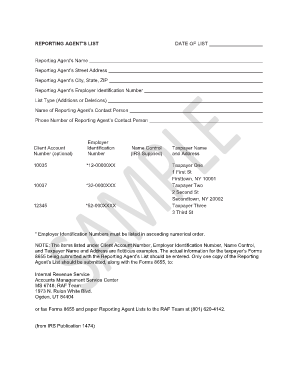
This guide provides straightforward instructions on how to effectively fill out the Reporting Agents List online. Completing this form accurately is essential for compliance and ensuring your clients' information is properly processed.
Follow the steps to complete the Reporting Agents List online.
- Click ‘Get Form’ button to obtain the Reporting Agents List and open it in the editor.
- Provide the date of the list in the designated field. Ensure that the date is formatted correctly according to any specified guidelines.
- Enter the reporting agent's name in the appropriate field. This should be the full legal name of the agent responsible for filing.
- Fill in the reporting agent’s street address, including any apartment numbers if applicable.
- Input the reporting agent’s city, state, and ZIP code. Verify the accuracy of the information to avoid any processing delays.
- Enter the reporting agent’s employer identification number (EIN). Ensure this number is accurate and corresponds to the correct reporting agent.
- Select the list type, indicating whether this entry pertains to additions or deletions. This helps clarify the context of the form submission.
- Provide the name of the reporting agent's contact person. This individual should be familiar with the submission and able to provide further information if needed.
- Enter the contact person’s phone number, ensuring it is correct and includes the area code.
- If applicable, fill in the client account number in the optional field. This may provide additional context to the IRS regarding the submission.
- List employer identification numbers in ascending numerical order as per the requirement. Include only EINs that are relevant to the entries.
- For each taxpayer, enter their name and address in the specified fields. Ensure accuracy as this information is crucial for processing.
- Once all fields are completed, review the information for any errors or omissions. Make necessary corrections before finalizing.
- After reviewing, you can save the changes, download, print, or share the Reporting Agents List as needed.
Start completing your Reporting Agents List online today for efficient document management.
Common tax mistakes include failing to report all income, overlooking deductions, and missing deadlines. These errors can lead to penalties and additional taxes owed. To avoid these pitfalls, consider using resources like the Reporting Agents List to find experienced professionals who can guide you through the tax process, ensuring you maximize your benefits and minimize your risks.