Loading
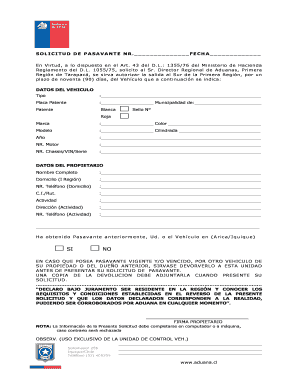
Get Pasavante
How it works
-

Open form follow the instructions
-

Easily sign the form with your finger
-

Send filled & signed form or save
How to fill out the Pasavante online
Filling out the Pasavante form is a necessary step for authorizing the exit of a vehicle for a specific duration. This guide will provide clear, step-by-step instructions to ensure that users can easily complete this form online.
Follow the steps to complete your Pasavante form accurately.
- Click the ‘Get Form’ button to obtain the Pasavante form and open it in the editing interface.
- In the 'Datos del Vehiculo' section, fill out the information about the vehicle, including the type, license plate, municipality, brand, color, model, engine number, chassis/VIN/series, and year.
- In the 'Datos del Propietario' section, enter your complete name, address in the region, home phone number, identification number (C.I./RUT), activity, activity address, and activity phone number.
- Indicate whether you have obtained a Pasavante previously for yourself or the vehicle by selecting 'Yes' or 'No'.
- If applicable, confirm whether you wish to return a current or expired Pasavante for another vehicle, and ensure that you attach a copy of the return when submitting the application.
- Finally, declare under oath that you are a resident in the region and that the information is true by signing the form.
- Once all fields are completed, save your changes, and consider downloading, printing, or sharing the completed form.
Complete your Pasavante document online today for a smooth process.
A Passante refers to an individual who is authorized to act on behalf of another in a legal context. This concept is essential when dealing with legal documents or transactions. With Pasavante, you can easily manage the roles and responsibilities of a Passante within your legal framework. This functionality streamlines processes and ensures compliance.