Loading
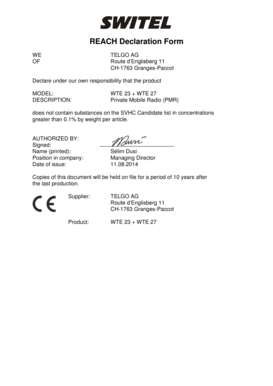
Get Reach Declaration Form
How it works
-

Open form follow the instructions
-

Easily sign the form with your finger
-

Send filled & signed form or save
How to fill out the REACH Declaration Form online
Filling out the REACH Declaration Form online can streamline your compliance processes regarding the safe use of chemical substances. This guide provides clear steps to help you complete the form accurately and efficiently.
Follow the steps to fill out the REACH Declaration Form online.
- Click the ‘Get Form’ button to obtain the REACH Declaration Form and open it in the editor.
- Begin by entering the company's name at the top of the form. In this case, the name should be 'TELGO AG'.
- Fill in the address fields with the company's complete address: 'Route d’Englisberg 11, CH-1763 Granges-Paccot.'
- In the product section, specify the product model and description. For this example, enter 'MODEL: WTE 23 + WTE 27' and 'DESCRIPTION: Private Mobile Radio (PMR)'.
- State your compliance by confirming that the product does not contain substances on the SVHC Candidate list in concentrations greater than 0.1% by weight per article.
- Authorize the declaration by signing the form. Leave space for the printed name, position within the company, and the date of issue.
- Ensure that information is correctly filled out. Review all entries for accuracy.
- Once completed, you can save changes, download, print, or share the form as needed.
Complete your documents online to ensure compliance and efficiency.
The primary purpose of REACH is to ensure a high level of protection for human health and the environment from chemical risks. It also promotes the safe use of chemicals by requiring companies to assess and manage the risks associated with their products. By obtaining a REACH Declaration Form, businesses can demonstrate their commitment to these objectives and ensure compliance.