Get Accident Report Form - Colorado.gov - Colorado
How it works
-

Open form follow the instructions
-

Easily sign the form with your finger
-

Send filled & signed form or save
How to use or fill out the Accident Report Form - Colorado.gov - Colorado online
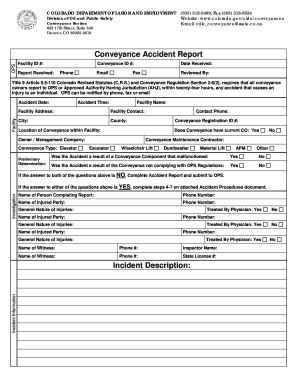
This guide provides comprehensive instructions on how to correctly complete the Accident Report Form for incidents involving conveyances in Colorado. By following these steps, users can ensure that their reports are accurately submitted to the appropriate authorities within the required timeframe.
Follow the steps to accurately complete the Accident Report Form online.
- Press the ‘Get Form’ button to access the Accident Report Form and open it for editing.
- Fill in the facility information, including the Facility ID, Facility Name, Address, City, and County. Make sure all details are accurate to ensure prompt processing.
- Indicate the Accident Date and Time to establish when the incident occurred.
- Provide the Conveyance Registration ID and specify the location of the conveyance within the facility.
- Select the Owner / Management Company responsible for the conveyance.
- Choose the type of conveyance involved in the accident from the list (elevator, escalator, wheelchair lift, etc.).
- Answer the questions regarding whether the accident was due to a component malfunction or non-compliance with regulations; select 'Yes' or 'No' for both.
- If applicable, input details about the person completing the report and provide their contact information.
- Record the names and contact information for all injured parties, alongside the nature of their injuries.
- Document any witnesses to the incident, including their names and phone numbers.
- Include a detailed incident description, highlighting key events that transpired during the accident.
- Once all fields are filled out correctly, save your changes, and choose to download, print, or share the completed form as needed.
Complete your Accident Report Form online today to ensure compliance and timely reporting.
Filing an accident report in Colorado involves filling out the required Accident Report Form - Colorado - Colorado. You can complete this form online or obtain a hard copy from local law enforcement. After providing the necessary information, make sure to submit it to the appropriate authority. Using platforms like uslegalforms can help you navigate the filing process efficiently and ensure compliance with state regulations.