Get Pplss
How it works
-

Open form follow the instructions
-

Easily sign the form with your finger
-

Send filled & signed form or save
How to fill out the Pplss online
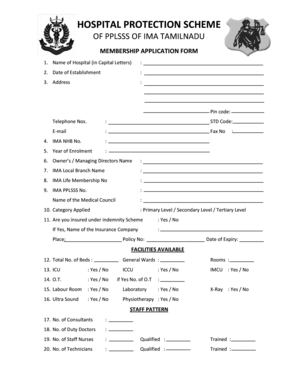
Filling out the Pplss membership application form can seem daunting, but with clear guidance, you can complete it efficiently. This guide will walk you through each section of the form, ensuring that you provide all necessary information accurately.
Follow the steps to complete your Pplss application successfully.
- Click ‘Get Form’ button to obtain the form and open it in your preferred editor.
- Begin by entering the name of the hospital in capital letters in the first field.
- Fill in the date of establishment of the hospital in the designated field.
- Provide the complete address of the hospital, including the pin code, telephone numbers, STD code, and email address.
- Input the fax number, if applicable.
- Enter the IMA NHB number and the year of enrolment.
- Include the name of the owner or managing director.
- Specify the local IMA branch name associated with the hospital.
- Fill in the IMA life membership number and the IMA Pplss number.
- Indicate the name of the medical council.
- Select the category applied for: Primary Level, Secondary Level, or Tertiary Level.
- Answer whether the hospital is insured under the indemnity scheme, and if yes, provide the name of the insurance company, policy number, and date of expiry.
- Detail the total number of beds, including general wards and rooms.
- Indicate if an ICU is available, as well as ICCU and IMCU facilities.
- Provide details about the operation theatre (O.T), including the number available if applicable.
- List if a labour room and laboratory facilities are available.
- Specify whether ultrasound, physiotherapy, and X-ray services are offered.
- Enter the total number of consultants, duty doctors, staff nurses, and their qualifications/training.
- Complete the section about the number of technicians and their qualifications/training.
- Fill in the payment details, including the DD number, bank, branch, amount, and date of issue. Be sure to indicate that the DD should be made out to 'Hospital Protection Scheme of Pplss of IMA Tamilnadu' and payable at Chennai.
- Mention the dispatch details, including the date and method of sending the application.
- Review all information for accuracy, then sign and date the declaration section.
- Some forms may require forwarding by a local branch president, secretary, or Pplss district coordinator, so ensure this is completed if necessary.
- Finally, save changes, then choose to download, print, or share the completed application form.
Start filling out your Pplss application form online today for a streamlined process.
Filling out the SSS (Social Security System) online can be straightforward if you follow a few simple steps. Start by visiting the official SSS website and accessing the online registration form. Ensure you have all necessary information, such as your personal details and any relevant documentation. If you encounter any challenges, Pplss can provide support and resources to help you complete the process smoothly.
Industry-leading security and compliance
-
In businnes since 199725+ years providing professional legal documents.
-
Accredited businessGuarantees that a business meets BBB accreditation standards in the US and Canada.
-
Secured by BraintreeValidated Level 1 PCI DSS compliant payment gateway that accepts most major credit and debit card brands from across the globe.