Loading
Form preview
  • US Legal Forms
  • Other Templates
  • More Forms
  • More Multi-State Forms
  • Lost, Stolen, Damaged Or Recovered Property Inventory Sheet.xls - Baylor

Get Lost, Stolen, Damaged Or Recovered Property Inventory Sheet.xls - Baylor

Goals: Collect the value of every personal property item that was damaged ordestroyed (up to your policy limits) in the least timeconsuming and painful waypossible. ... Use UP's Home Inventory Spreadsheet;.

How it works

  1. Open form

    Open form follow the instructions

  2. Easily sign form

    Easily sign the form with your finger

  3. Share form

    Send filled & signed form or save

How to use or fill out the Lost, Stolen, Damaged Or Recovered Property Inventory Sheet.xls - Baylor online

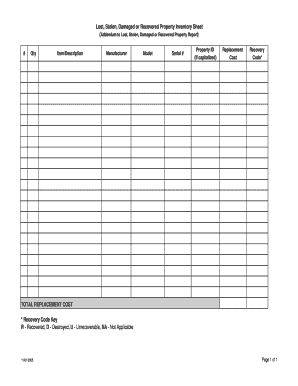
Filling out the Lost, Stolen, Damaged Or Recovered Property Inventory Sheet is an important step in documenting and reporting property issues. This guide provides step-by-step instructions to help you accurately complete the form online, ensuring your submissions are clear and organized.

Follow the steps to effectively complete the property inventory sheet.

  1. Press the ‘Get Form’ button to obtain the Lost, Stolen, Damaged Or Recovered Property Inventory Sheet. This will open the document in an online editor, ready for you to fill out.
  2. Begin by entering the quantity of items in the 'Qty' field for each property being reported. Ensure you accurately count the number of items to reflect your inventory correctly.
  3. In the 'Item/Description' field, provide a clear and detailed description of each item. This should include relevant details like the type of item, brand, or any unique characteristics to help with identification.
  4. Fill in the 'Manufacturer' field with the name of the company that produced the item. This helps to identify the producer and can assist in locating replacement parts or verifying the item's authenticity.
  5. Enter the 'Model' number in the designated area. This specific identifier can be critical when seeking replacements or repairs.
  6. Complete the 'Serial #' field by entering the item's unique serial number. This is essential when reporting stolen or lost items, as it provides a means of tracking the specific product.
  7. If applicable, include the 'Property ID' in the indicated field. This is particularly important if the property was previously registered or logged for institutional use.
  8. Input the 'Replacement Cost' for each item. This estimate will help in understanding the financial implication of loss and can ease the process of recovery or insurance claims.
  9. Assign the appropriate 'Recovery Code' for each reported item using the provided key. Indicate whether the item was recovered (R), destroyed (D), unrecoverable (U), or not applicable (NA).
  10. After completing all fields, review your entries for accuracy and completeness. Ensure that all items are documented and coded correctly.
  11. Once you are satisfied with the information entered, you can save your changes, download, print, or share the form as necessary.

Begin filling out your property inventory sheet online today to ensure your assets are properly documented and reported.

Get form

Experience a faster way to fill out and sign forms on the web. Access the most extensive library of templates available.
Get form

Related content

Publication 225 - Internal Revenue Service
Oct 15, 2020 — Internal Revenue Service, Tax Forms and Pub- lications ... is a new Form...
Learn more
entrepreneurship and small business manacement...
ing issues: small business planning, inventory management, pricing strategy, fore- casting...
Learn more
Prosecuting Ip Crimes Manual 2013...
Prosecuting Intellectual Property Crimes H. Marshall Jarrett Director, EOUSA Fourth ... in...
Learn more

Related links form

WA Accessory Dwelling Unit Application 2011 WA AF-727 WA AOHC Staff Registration Form 2011 WA Assignment of Funds 05-08-2000] 2000

Questions & Answers

Get answers to your most pressing questions about US Legal Forms API.

Contact support

Yes, businesses can typically write off lost inventory as a loss in their financial statements. It is crucial to maintain proper documentation, such as the Lost, Stolen, Damaged Or Recovered Property Inventory Sheet.xls - Baylor, to support your write-off claims. This documentation not only aids in accounting but also assists in future inventory assessments.

Reporting missing inventory involves documenting the loss and notifying relevant parties, such as management or law enforcement. You can utilize the Lost, Stolen, Damaged Or Recovered Property Inventory Sheet.xls - Baylor to create a detailed report, which can streamline the process and ensure you have the necessary information for follow-up actions.

To record inventory loss in accounting, you will need to adjust your inventory account to reflect the loss. Employ the Lost, Stolen, Damaged Or Recovered Property Inventory Sheet.xls - Baylor to provide clear details of the lost items, which can support your accounting entries and help maintain accurate financial records.

When you give away inventory, it is essential to document the items in your accounting records. Use the Lost, Stolen, Damaged Or Recovered Property Inventory Sheet.xls - Baylor to track these giveaways, including details such as date, recipient, and item descriptions. This practice ensures transparency and accuracy in your inventory management.

When inventory is stolen, it is typically referred to as inventory theft or shrinkage. This loss significantly impacts your business's financial health. Utilizing the Lost, Stolen, Damaged Or Recovered Property Inventory Sheet.xls - Baylor can help you record and manage these incidents, allowing you to take necessary actions for recovery or reporting.

To record lost inventory, first, identify the items that are missing and document their details. Use the Lost, Stolen, Damaged Or Recovered Property Inventory Sheet.xls - Baylor to log the lost items, including descriptions and estimated values. This sheet helps maintain accurate records and facilitates tracking over time, ensuring you can manage your inventory effectively.

To effectively recover stolen property, it is vital to maintain a detailed record of your belongings. Using the Lost, Stolen, Damaged Or Recovered Property Inventory Sheet.xls - Baylor can significantly assist you in documenting and organizing this information. This sheet should include descriptions, serial numbers, and photographs of your items. Additionally, promptly reporting the theft to law enforcement and providing them with your inventory can enhance the chances of recovery.

To account for damaged inventory, assess the damage and determine the financial impact. You should debit the loss account and credit the inventory account to adjust your records accordingly. Utilizing the Lost, Stolen, Damaged Or Recovered Property Inventory Sheet.xls - Baylor can streamline this process, ensuring that all damages are tracked effectively.

When you scrap inventory, you need to recognize the loss in your financial records. This typically involves debiting the loss account and crediting the inventory account to remove it from your books. Documenting scrapped inventory in your Lost, Stolen, Damaged Or Recovered Property Inventory Sheet.xls - Baylor ensures you have a comprehensive view of your inventory status.

The journal entry for damaged inventory involves debiting a loss account to reflect the financial impact and crediting the inventory account to decrease its value. This entry is essential for maintaining accurate financial records. Using your Lost, Stolen, Damaged Or Recovered Property Inventory Sheet.xls - Baylor allows you to document these changes clearly.

Get This Form Now!

Use professional pre-built templates to fill in and sign documents online faster. Get access to thousands of forms.
Get form
If you believe that this page should be taken down, please follow our DMCA take down processhere.
Get Lost, Stolen, Damaged Or Recovered Property Inventory Sheet.xls - Baylor
Get form
  • Adoption
  • Bankruptcy
  • Contractors
  • Divorce
  • Home Sales
  • Employment
  • Identity Theft
  • Incorporation
  • Landlord Tenant
  • Living Trust
  • Name Change
  • Personal Planning
  • Small Business
  • Wills & Estates
  • Packages A-Z
  • Affidavits
  • Bankruptcy
  • Bill of Sale
  • Corporate - LLC
  • Divorce
  • Employment
  • Identity Theft
  • Internet Technology
  • Landlord Tenant
  • Living Wills
  • Name Change
  • Power of Attorney
  • Real Estate
  • Small Estates
  • Wills
  • All Forms
  • Forms A-Z
  • Other Templates
  • Legal Hub
  • About Us
  • Help Portal
  • Legal Resources
  • Blog
  • Affiliates
  • Contact Us
  • Delete My Account
  • Site Map
  • Industries
  • Forms in Spanish
  • Localized Forms
  • State-specific Forms
  • Forms Kit
  • Real Estate Handbook
  • All Guides
  • Notarize
  • Incorporation services
  • For Consumers
  • For Small Business
  • For Attorneys
  • USLegal
  • FormsPass
  • pdfFiller
  • signNow
  • altaFlow
  • DocHub
  • Instapage
Form Packages
  • Adoption
  • Bankruptcy
  • Contractors
  • Divorce
  • Home Sales
  • Employment
  • Identity Theft
  • Incorporation
  • Landlord Tenant
  • Living Trust
  • Name Change
  • Personal Planning
  • Small Business
  • Wills & Estates
  • Packages A-Z
Form Categories
  • Affidavits
  • Bankruptcy
  • Bill of Sale
  • Corporate - LLC
  • Divorce
  • Employment
  • Identity Theft
  • Internet Technology
  • Landlord Tenant
  • Living Wills
  • Name Change
  • Power of Attorney
  • Real Estate
  • Small Estates
  • Wills
  • All Forms
  • Forms A-Z
  • Other Templates
Customer Service
  • Legal Hub
  • About Us
  • Help Portal
  • Legal Resources
  • Blog
  • Affiliates
  • Contact Us
  • Delete My Account
  • Site Map
  • Industries
  • Forms in Spanish
  • Localized Forms
  • State-specific Forms
  • Forms Kit
Legal Guides
  • Real Estate Handbook
  • All Guides
Prepared for you
  • Notarize
  • Incorporation services
Our Customers
  • For Consumers
  • For Small Business
  • For Attorneys
Our Sites
  • USLegal
  • FormsPass
  • pdfFiller
  • signNow
  • altaFlow
  • DocHub
  • Instapage
Social Media
Call us now toll free:
+1 833 426 79 33
As seen in:
© Copyright 1999-2026 airSlate Legal Forms, Inc. 17 Station Street, Ste. 203, Brookline, MA 02445
  • Your Privacy Choices
  • Terms of Service
  • Privacy Notice
  • Content Takedown Policy
  • Bug Bounty Program