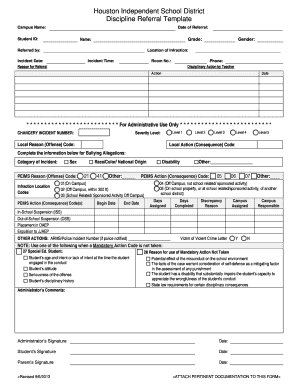
Get Houston Isd Student Discipline Referral
How it works
-

Open form follow the instructions
-

Easily sign the form with your finger
-

Send filled & signed form or save
How to fill out the Houston Isd Student Discipline Referral online
This guide will assist you in completing the Houston Isd Student Discipline Referral form accurately and efficiently. It provides step-by-step instructions to ensure all necessary information is entered correctly, making the process straightforward for users.
Follow the steps to complete the Houston Isd Student Discipline Referral form.
- Press the ‘Get Form’ button to retrieve the document and open it in your editing tool.
- Enter the date of referral in the designated field to specify when the incident was reported.
- Fill in the campus name where the incident occurred. This helps identify the specific location within the Houston Independent School District.
- Input the name of the student involved. Ensure that the name matches official records for accurate processing.
- Enter the student ID number, which is essential for student identification within the system.
- Indicate the grade of the student at the time of the incident to provide context regarding the age group.
- Complete the section for the name of the person who is referring the incident, providing clarity on who initiated the referral.
- Select the gender of the student from the available options to maintain accurate records.
- Document the location of the infraction within the school to help pinpoint the incident's context.
- Provide the date of the incident to align with the referral date and track occurrences accurately.
- Specify the exact time of the incident, as timing can be crucial for understanding the context.
- Input the room number where the incident took place for detailed record-keeping.
- Complete the phone number field for follow-up communication regarding the referral.
- Document any disciplinary actions taken by the teacher, including what actions were implemented and their corresponding dates.
- For administrative use, complete the required sections, including CHANCERY INCIDENT NUMBER, severity levels, and action codes related to the incident.
- If applicable, fill out sections related to bullying allegations, indicating the category of the incident and relevant codes.
- Complete the PEIMS action codes and any other relevant details about disciplinary actions or placements.
- Gather and attach any pertinent documentation that supports the referral, as indicated on the form.
- Once all fields are filled, review the form for accuracy, save your changes, and prepare to download, print, or share the form as needed.
Complete the Houston Isd Student Discipline Referral online today for an efficient documentation process.
Writing a student referral requires clarity and detail about the incident in question. Begin by noting the student’s name, date, and description of the behavior that led to the referral. Be specific about the circumstances and any previous interventions attempted. If you need guidance on creating effective referral forms, consider exploring the resources offered by USLegalForms, as they provide templates tailored for situations like Houston ISD Student Discipline Referrals.