Loading
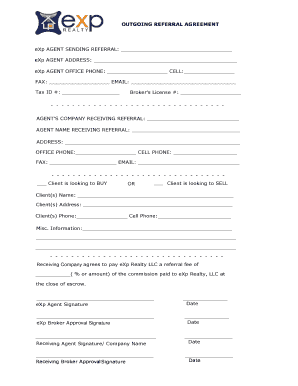
Get Outgoing Referral Form - Websitebox.com
How it works
-

Open form follow the instructions
-

Easily sign the form with your finger
-

Send filled & signed form or save
How to fill out the Outgoing Referral Form - Websitebox.com online
This guide will help you navigate the process of filling out the Outgoing Referral Form efficiently and accurately. By following these steps, you can ensure that your referral is documented properly, facilitating a smooth transaction.
Follow the steps to complete your referral form online.
- Click 'Get Form' button to access the Outgoing Referral Form and open it in your chosen editor.
- Begin by filling in your information as the eXp agent sending the referral. This includes your name, brokerage information, address, phone numbers, fax number, email, tax identification number, and broker's license number.
- Next, provide the details for the agent company receiving the referral. Include the company's name, and the agent's name, along with their address, office phone, cell phone, fax number, and email.
- Indicate whether the client is looking to buy or sell by selecting the appropriate checkbox. Make sure to fill in the client(s) name, address, and phone numbers accurately.
- In the miscellaneous information section, provide any additional relevant details about the client or the referral situation.
- Specify the referral fee arrangement in the designated area, stating either a percentage or a specific amount of the commission that will be paid to eXp Realty LLC upon closing.
- Lastly, sign and date the form in the appropriate sections, including signatures for both the eXp agent and broker, as well as the receiving agent and their broker.
- Once all fields are completed, you can save your changes, download the document, print it, or share it online for ease of access.
Take the next step in your referral process by completing the Outgoing Referral Form online today.
Related links form
Utilizing an electronic Outgoing Referral Form - Websitebox offers numerous benefits. It streamlines the referral process, reduces paperwork, and minimizes the chance of errors. Additionally, electronic forms can be easily shared and stored securely, making them accessible whenever needed. This efficiency enhances collaboration between professionals and improves client service.