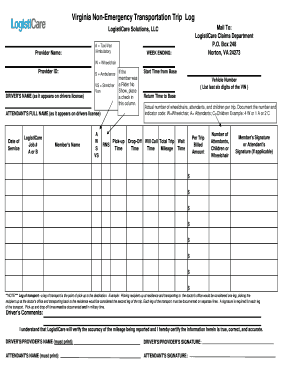
Get Virginia Non Emergency Transportation Log
How it works
-

Open form follow the instructions
-

Easily sign the form with your finger
-

Send filled & signed form or save
How to fill out the Virginia Non-Emergency Transportation Log online
Completing the Virginia Non-Emergency Transportation Log online is essential for ensuring accurate documentation of transportation services. This guide provides step-by-step instructions to assist you in filling out the form correctly.
Follow the steps to complete the Virginia Non-Emergency Transportation Log.
- Click ‘Get Form’ button to obtain the form and open it in the editor.
- Enter the provider name at the top of the form, specifying the type of service (e.g., Taxi/Van, Ambulatory, or other applicable options).
- Indicate the week ending date for the transport services provided.
- Fill in the provider ID associated with the transportation services.
- Document the driver's name as it appears on their driver's license.
- If applicable, check the box for 'Rider No Show' in case the member did not show up for the ride.
- Enter the attendant's full name, again as it appears on their driver's license.
- Record the date of service for the transport provided.
- Include the LogistiCare job number and indicate the associated service type (A/B).
- Document the member's name receiving the transportation services.
- Detail the pick-up time using military time, along with the vehicle number (last six digits of the VIN).
- Record the return time to base and document the actual number of wheelchairs, attendants, and children being transported in the specified format (e.g., 4 W, 1 A, 2 C).
- Fill out the billed amounts for each trip segment, including any additional cost fields provided in the form.
- Enter total trip wait time, time, and mileage for each leg of the transport.
- Acquire the member's signature or the attendant's signature, if applicable, for each leg of transport.
- Complete the driver's comments section, certifying the accuracy of the reported information.
- Finally, print or save the document to retain a copy for your records and submit it as instructed.
Complete your Virginia Non-Emergency Transportation Log online to ensure accurate and timely processing.
Starting non-emergency medical transportation involves several key steps. Begin by creating a solid business plan that outlines your services, target market, and operational strategies. It's essential to maintain a Virginia Non Emergency Transportation Log to document trips and ensure accountability. Utilizing services like US Legal Forms can simplify your journey by providing templates for contracts and other essential documents, making your startup process easier.