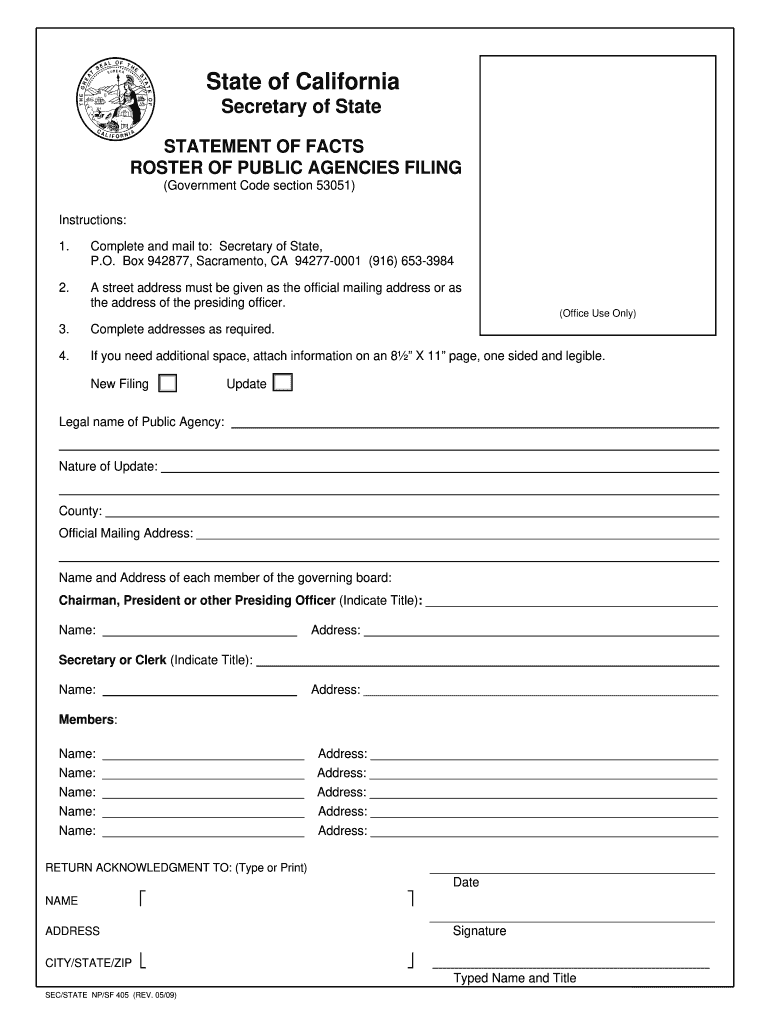
877, Sacramento, CA 94277-0001 (916) 653-3984 2. A street address must be given as the official mailing address or as the address of the presiding officer. 3. Complete addresses as required. 4. If you need additional space, attach information on an 8 X 11 page, one sided and legible. New Filing (Office Use Only) Update Legal name of Public Agency: Nature of Update: County: Official Mailing Address: Name and Address of each member of the governing board: Chairman, President or.
Loading

Open form follow the instructions

Easily sign the form with your finger

Send filled & signed form or save
How to fill out the Sos Npsf 405 online
Filling out the Sos Npsf 405 form is an essential process for public agencies in California to maintain updated information with the Secretary of State. This guide provides clear, step-by-step instructions to help you navigate through each section of the form online efficiently.
Follow the steps to successfully complete the Sos Npsf 405 form.
- Press the ‘Get Form’ button to access the Sos Npsf 405 form, which will open in an online format for easy editing.
- Begin by providing the legal name of the public agency in the designated field. Ensure that the name is accurate and reflects the official title of your agency.
- Indicate the nature of the update (if applicable) by selecting the appropriate option from the dropdown menu or by typing it directly into the field.
- Fill in the county where the public agency is located. This ensures that the information is correctly associated with your geographical area.
- Enter the official mailing address of the agency. This should be complete and include details such as street name, number, city, state, and ZIP code.
- List the names and addresses of each member of the governing board, including the title of the presiding officer (e.g., Chairman, President). Make sure the addresses are clear and complete.
- If you have additional members, be sure to include their names and addresses in the appropriate sections provided on the form.
- For any additional information that does not fit within the provided fields, attach an extra page in an 8½” X 11” format, ensuring it is legible.
- Complete the acknowledgment section by typing or printing the return acknowledgment name, date, signature, and address. Ensure that all information is accurate.
- After reviewing all entries for accuracy, you can save your changes, download a copy for your records, print the form, or share it as necessary.
Begin your process of completing the Sos Npsf 405 form online today.
Experience a faster way to fill out and sign forms on the web. Access the most extensive library of templates available.
Related content
2019 California Secretary of State bizfile.sos.ca.gov. Secretary of State. SF-405. This...
Navier-Stokes. NIST. National Institute of Standards and Technology. NPSF ... SoS. Speed...
Get answers to your most pressing questions about US Legal Forms API.
How to file statement of information with CA SOS?
Filing a statement of information with the California Secretary of State (CA SOS) involves a few straightforward steps. First, gather the necessary details about your business, including the Sos Npsf 405 form, which contains essential information about your entity. Next, you can complete the form online or download it for submission by mail. Finally, ensure you submit your statement within the required timeframe to maintain compliance and avoid potential penalties.
What is the government code 53051?
Government Code 53051 outlines the requirements for business entity filings in California, including S Corporations. This code mandates that all business entities maintain current and accurate information with the Secretary of State. Understanding this code is crucial, and resources like Sos Npsf 405 can help you navigate these legal requirements effectively, ensuring your business remains compliant.
How long does it take to start an S Corp in California?
Starting an S Corporation in California typically takes around 2 to 3 weeks to file your initial paperwork, followed by additional time for IRS approval. The entire process can be expedited with well-organized documentation and the right guidance. With Sos Npsf 405, you can simplify the steps involved, ensuring a smooth transition into your new business structure.
How long does it take to get an S Corp in California?
In California, the timeline to establish an S Corporation often takes between 6 to 8 weeks once you submit your application. This duration includes processing time and any potential state reviews. By leveraging the efficient tools available through Sos Npsf 405, you can expedite the application process and ensure all documentation is accurate and complete.
How long does it take for a S Corp to be approved?
The approval process for an S Corporation can vary depending on several factors, such as the state of formation and the completeness of your application. Generally, after submitting the required forms, you can expect a response within 60 to 90 days. However, utilizing resources like Sos Npsf 405 can streamline your process, making it easier to manage the necessary paperwork and avoid delays.
Who needs to register with CA SOS?
Any business entity operating in California, including corporations, limited liability companies, and partnerships, must register with the California Secretary of State. This registration ensures your business complies with state laws and regulations. For more detailed information about Sos Npsf 405 and registration requirements, US Legal Forms is a valuable resource.
How to find CA SOS file number?
To find your CA SOS file number, use the California Secretary of State's online business search tool. Enter your business name or entity type, and the system will display relevant details, including your file number. If you need further assistance, US Legal Forms can provide comprehensive guidance regarding your Sos Npsf 405 information.
How to find secretary of state filing charter number?
You can find your Secretary of State filing charter number by checking your original business registration documents or by searching your state’s Secretary of State website. Many states have online search features that allow you to retrieve this information easily. For additional support, consider using US Legal Forms, which can assist you in understanding your Sos Npsf 405 requirements.
How do I find my California SOS file number?
To find your California SOS file number, visit the California Secretary of State's business entity search page. By entering your business name or other identifiers, you can access your file number quickly. If you encounter difficulties, US Legal Forms provides useful tools and insights related to Sos Npsf 405.
How to contact SOS California?
You can contact the Secretary of State in California through their official website, where you can find phone numbers and email addresses for various departments. Additionally, they offer online services that may answer your questions without needing to call. If you're looking for specific information regarding Sos Npsf 405, US Legal Forms can help streamline the process.
Use professional pre-built templates to fill in and sign documents online faster. Get access to thousands of forms.
If you believe that this page should be taken down, please follow our DMCA take down process here.