Loading
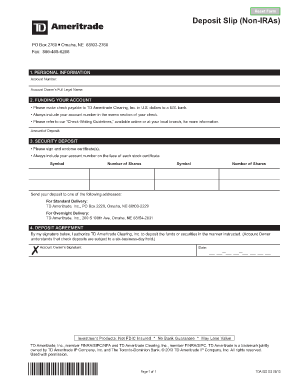
Get Td Ameritrade Deposit Form
How it works
-

Open form follow the instructions
-

Easily sign the form with your finger
-

Send filled & signed form or save
How to fill out the Td Ameritrade Deposit Form online
Completing the Td Ameritrade Deposit Form online is a straightforward process that requires careful attention to detail. This guide will walk you through each step, ensuring that you provide all the necessary information accurately and efficiently.
Follow the steps to successfully complete your Td Ameritrade Deposit Form online.
- Press the ‘Get Form’ button to retrieve the Td Ameritrade Deposit Form and open it in your preferred document editor.
- In the 'Personal Information' section, enter your account number and the account owner's full legal name as it is registered with Td Ameritrade.
- Next, move to the 'Funding Your Account' section. Here, specify the amount you wish to deposit. Remember to make checks payable to TD Ameritrade Clearing, Inc. in U.S. dollars, and include your account number in the memo section of the check.
- For the 'Security Deposit' section, if you are depositing stock certificates, be sure to sign and endorse the certificates and write your account number on the face of each stock certificate. List the symbols and number of shares for each certificate you are depositing.
- In the 'Deposit Agreement' section, provide your signature to authorize TD Ameritrade Clearing, Inc. to process your deposit according to the provided instructions. Ensure that you understand that check deposits may be subject to a six-business-day hold.
- Finally, review all the information you have filled out for accuracy. Once you have completed the form, you can save your changes, download the completed document, print it, or share it as necessary.
Take the next step and complete your Td Ameritrade Deposit Form online today!
To send your direct deposit form to TD, first ensure that you have completed the Td Ameritrade Deposit Form correctly. After that, you can either submit it online through your TD account portal or mail it to the specified address provided on the form. If you need assistance, consider using the resources available on the uslegalforms platform to ensure a smooth submission process.