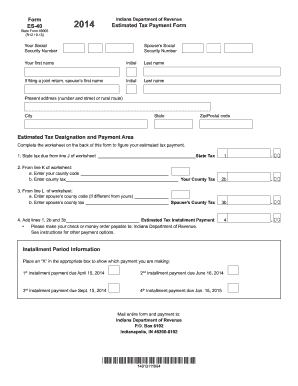
Last name If filing a joint return, spouse s first name Initial Last name Present address (number and street or rural route) City State Zip/Postal code Estimated Tax Designation and Payment Area Complete the worksheet on the back of this form to figure your estimated tax payment. 1. State tax due from line J of worksheet State Tax 1 .00 2. From line K of worksheet: a. Enter your county code b. Enter county t.
Open form follow the instructions
Easily sign the form with your finger
Send filled & signed form or save
How to fill out the Indiana Estimated Tax Payment Form 2020 online
Filling out the Indiana Estimated Tax Payment Form 2020 online can seem daunting, but with the right guidance, it becomes a straightforward process. This guide will walk you through each step to ensure you complete the form accurately and efficiently.
Follow the steps to fill out the form correctly.
- Click 'Get Form' button to obtain the form and open it in your preferred editor.
- Begin by entering your Social Security number and, if applicable, your spouse’s Social Security number at the top of the form.
- Next, fill in your first name, middle initial, and last name. If applicable, include your spouse’s first name, middle initial, and last name.
- Provide your present address, including street number and name, city, state, and zip/postal code.
- Complete the Estimated Tax Designation and Payment Area. Use the worksheet on the back of the form to determine the state tax due, county codes, and county tax.
- In the installment period information section, select the appropriate box to indicate the payment you are making (1st, 2nd, 3rd, or 4th installment).
- Review your form for completeness and accuracy, ensuring all required information is correctly filled out.
- Once completed, you can save any changes, download, print, or share the form as necessary.
Start filling out your Indiana Estimated Tax Payment Form online now to ensure timely submission.
Experience a faster way to fill out and sign forms on the web. Access the most extensive library of templates available.
Related content
IT-40 Booklet (Spanish Version), SP 270, 2020 Indiana El formulario IT-40 del residente...
Feb 6, 2020 — Use Form 1040-ES to figure and pay your estimated tax for 2020. Estimated...
The Indianapolis Colts are an American football team based in Indianapolis. The Colts...
Get answers to your most pressing questions about US Legal Forms API.
Where can I download a 2020 tax form?
You can download the 2020 tax forms from the official IRS website or the Indiana Department of Revenue's website. Both platforms offer various forms, including the Indiana Estimated Tax Payment Form 2020. Simply navigate to the forms section, select the year, and download the necessary documents.
How to look up payments made to the IRS?
To look up payments made to the IRS, you can use the IRS's online account service. By logging in, you can view your payment history and confirm any estimated tax payments made. If you have used the Indiana Estimated Tax Payment Form 2020, having that information handy will help you match your records with the IRS.
Is there a form for estimated tax payments?
Yes, there is a specific form for estimated tax payments in Indiana. You should use the Indiana Estimated Tax Payment Form 2020 to report your estimated taxes. This form is crucial for individuals and businesses who need to make quarterly tax payments.
How to download a tax payment certificate?
To download a tax payment certificate, visit the website of the Indiana Department of Revenue and navigate to their online services. You may need to create an account to access your payment history. If you have used the Indiana Estimated Tax Payment Form 2020, ensure you have all necessary details handy to streamline the download process.
Does the IRS send confirmation of estimated tax payments?
The IRS does not send direct confirmation of your estimated tax payments. However, you can track your payments through your IRS account online. Keeping a copy of your Indiana Estimated Tax Payment Form 2020 also serves as a personal record to confirm your payments.
How can I get proof of estimated tax payments?
To obtain proof of your estimated tax payments, you can access your tax records through the Indiana Department of Revenue. They provide online services where you can view and print your payment history. Additionally, if you used the Indiana Estimated Tax Payment Form 2020, you should keep copies for your records as they serve as proof of payment.
Is there a difference between 1040 and 1040es?
Yes, there is a significant difference between the 1040 and 1040es forms. The 1040 is the standard tax return form filed annually, while the 1040es is specifically for making estimated tax payments throughout the year. Understanding this distinction is vital, especially for Indiana taxpayers who must also consider the Indiana Estimated Tax Payment Form 2020 in their planning.
What is form IT-40 in Indiana?
Form IT-40 in Indiana is the state's individual income tax return form. It is used by residents to report their income and calculate tax due. When filing, be sure to include the Indiana Estimated Tax Payment Form 2020 if you made estimated payments throughout the year, ensuring all obligations are met.
What is the 1040es form for 2020?
The 1040es form for 2020 is a simplified version of the IRS estimated tax payment form. It helps taxpayers calculate their estimated tax obligations based on income and deductions. For those in Indiana, using the Indiana Estimated Tax Payment Form 2020 alongside 1040es can provide a complete picture of your tax responsibilities.
Is there a 1040 EZ form for 2020?
The 1040 EZ form is not available for 2020. The IRS replaced it with the redesigned 1040 form, which accommodates various tax situations. For residents in Indiana, understanding the Indiana Estimated Tax Payment Form 2020 is essential for accurate reporting. You can find the necessary forms and guidance on platforms like USLegalForms.
Use professional pre-built templates to fill in and sign documents online faster. Get access to thousands of forms.
If you believe that this page should be taken down, please follow our DMCA take down process here.