Loading
Get Form R.s. 4.1 An Application For Temporary Registration
How it works
-

Open form follow the instructions
-

Easily sign the form with your finger
-

Send filled & signed form or save
How to fill out the FORM R.S. 4.1 An Application For Temporary Registration online
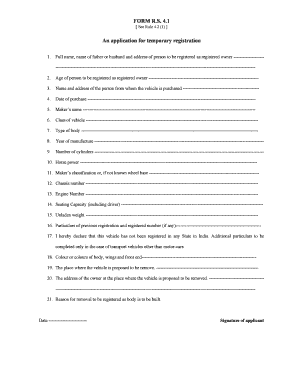
This guide provides clear and detailed instructions on completing the FORM R.S. 4.1, an application for temporary registration. By following these steps, users can efficiently fill out the form online to facilitate their vehicle registration process.
Follow the steps to complete the application for temporary registration.
- Click the ‘Get Form’ button to access the form and open it in your editor.
- In the first section, enter your full name, your father or partner's name, and the address of the individual who will be registered as the owner.
- Input the age of the individual who is being registered as the owner.
- Provide the name and address of the person from whom the vehicle was purchased.
- Specify the date on which the vehicle was purchased.
- Enter the maker's name of the vehicle.
- Indicate the class of the vehicle.
- Describe the type of body for the vehicle.
- State the year of manufacture of the vehicle.
- Fill in the number of cylinders of the engine.
- Provide the horse power of the vehicle.
- If known, enter the maker's classification or the wheelbase; if not known, leave blank.
- Input the chassis number of the vehicle.
- Enter the engine number.
- Indicate the seating capacity, including the driver.
- Provide the unladen weight of the vehicle.
- If applicable, provide particulars of previous registration and registered number.
- Declare that the vehicle has not been registered in any State in India.
- For transport vehicles other than motor-cars, complete the additional particulars.
- Specify the color or colors of the body, wings, and front end.
- Describe the place where the vehicle is intended to be removed.
- Input the address of the owner where the vehicle is proposed to be removed.
- Supply the reason for registering the vehicle as a body to be built.
- Finally, date and sign the application.
- Once you have completed all sections of the form, save your changes, and you will have the option to download, print, or share the form.
Complete your application for temporary registration online now.
Related links form
Yes, Vermont does issue temporary plates for vehicles. This is particularly useful for individuals who need to drive their vehicles while waiting for permanent registration. To obtain temporary plates, you will need to fill out FORM R.S. 4.1 An Application For Temporary Registration, providing necessary documentation to the Vermont DMV. This process helps ensure you are compliant with state regulations.