Loading
Get Dtop Gov Pr
How it works
-

Open form follow the instructions
-

Easily sign the form with your finger
-

Send filled & signed form or save
How to fill out the Dtop Gov Pr online
Filling out the Dtop Gov Pr form can be a straightforward process when guided properly. This guide provides a clear, step-by-step approach to completing the application accurately and efficiently.
Follow the steps to complete the Dtop Gov Pr form online.
- Click ‘Get Form’ button to obtain the form and open it in the editor.
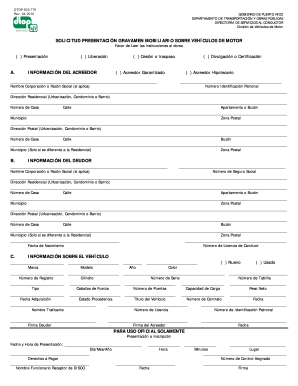
- Choose the type of application you are submitting by selecting the appropriate option: 'Presentation', 'Release', or 'Assignment or Transfer'. Fill in the corresponding checkbox.
- Provide the information of the creditor, including the corporate name or business name if applicable, Employer Identification Number (EIN), and residential address. Ensure to fill out the municipality and postal zone accurately.
- Indicate the creditor’s type by selecting either 'Guaranteed Creditor' or 'Mortgage Creditor'.
- Next, input the debtor’s information similarly, including their name, Social Security Number, residential address, and if applicable, any different postal address.
- Fill in the debtor’s date of birth and driver's license number.
- Proceed to the vehicle information section. Here, provide the make, model, year, and color of the vehicle. Indicate whether the vehicle is new or used.
- Complete the remaining vehicle specifics including registration number, cylinder count, serial number, license plate number, doors count, and weight. Ensure all details are accurate.
- Supply the equipped date of the vehicle and the name and license number of the dealer.
- The debtor should sign and date the form, followed by the creditor signing and dating their section.
- Once all sections are completed, review the form for accuracy. You can then save changes, download, print, or share the completed form as needed.
Complete your online documents with ease by following our guide.
Related links form
DTOP Puerto Rico, or the Department of Transportation and Public Works, manages transportation services and regulations in Puerto Rico. This includes overseeing vehicle registrations, driver licenses, and real ID applications. By utilizing the resources available on the Dtop Gov Pr website, you can access essential services and information that simplify your interactions with transportation authorities.