Loading
Get Liquid Smoke - Zip-net
How it works
-

Open form follow the instructions
-

Easily sign the form with your finger
-

Send filled & signed form or save
How to fill out the Liquid Smoke - ZIP-net online
Filling out the Liquid Smoke - ZIP-net form online is an important process for ensuring accurate documentation of your product. This guide will provide you with step-by-step instructions to navigate each section of the form effectively.
Follow the steps to complete the Liquid Smoke - ZIP-net form accurately.
- Press the ‘Get Form’ button to access the Liquid Smoke - ZIP-net form and open it in your preferred online editor.
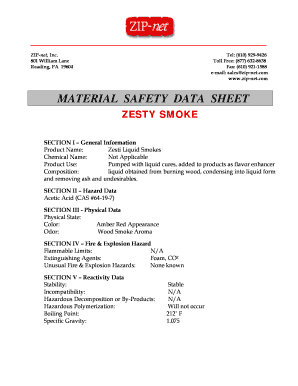
- Begin by entering the product name in the designated field. In this case, input 'Zesti Liquid Smokes' to accurately represent the product.
- For the chemical name, indicate 'Not Applicable' since it is not required for this product.
- Next, specify the product use. In this field, describe the purpose, noting that it is 'pumped with liquid cures and added to products as a flavor enhancer.'
- Input the composition details. Describe the product as 'liquid obtained from burning wood, condensing into liquid form and removing ash and undesirables.'
- Navigate to the hazard data section and list acetic acid with its corresponding CAS number, '64-19-7'.
- Proceed to the physical data section. Fill in the physical state, color, and odor fields as follows: Physical state - 'Liquid'; Color - 'Amber Red Appearance'; Odor - 'Wood Smoke Aroma'.
- Check the fire & explosion hazard section. Enter information regarding flammable limits as 'N/A' and extinguishing agents as 'Foam, CO2'. Specify that there are no unusual fire and explosion hazards known.
- In the reactivity data section, confirm stability as 'Stable', compatibility as 'N/A', and hazardous polymerization as 'Will not occur'. Fill in the boiling point as '212˚ F' and specific gravity as '1.075'.
- Fill out the toxicity and health section, noting that there are no adverse health effects for medical conditions. Include details for exposure via inhalation, eyes, skin, and ingestion, as per the provided guidance.
- Complete the storage and handling precautions section, detailing spill, leak, or disposal practices, and noting that the material should be disposed of properly and stored in a cool, dry place.
- Lastly, finish the form by confirming that the plant has been inspected and approved by the Tennessee Department of Agriculture and the U.S.D.A.
- Once all sections are completed, review your entries for accuracy. You can then save changes, download, print, or share the Liquid Smoke - ZIP-net form as needed.
Start completing your documents online today to ensure accurate and timely submissions.
Yes, you can apply Liquid Smoke - ZIP-net directly on the meat, especially when marinating. A few drops can marinate your proteins beautifully, allowing the flavor to penetrate. However, be cautious with the amount; a little goes a long way, and using it sparingly will yield the best results.
Industry-leading security and compliance
US Legal Forms protects your data by complying with industry-specific security standards.
-
In businnes since 199725+ years providing professional legal documents.
-
Accredited businessGuarantees that a business meets BBB accreditation standards in the US and Canada.
-
Secured by BraintreeValidated Level 1 PCI DSS compliant payment gateway that accepts most major credit and debit card brands from across the globe.