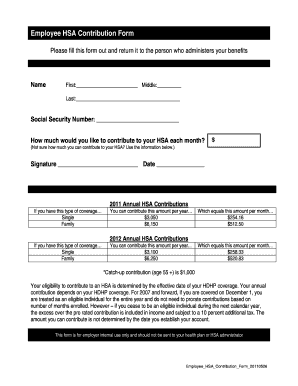
Employee HSA Contribution Form Please fill this form out and return it to the person who administers your benefits Name First: Middle: Last: Social Security Number: How much would you like to contribute.
Open form follow the instructions
Easily sign the form with your finger
Send filled & signed form or save
How to fill out the Employee HSA Contribution Form 20110526 - HealthEquity online
Filling out the Employee HSA Contribution Form 20110526 - HealthEquity is a straightforward process aimed at helping you manage your Health Savings Account (HSA) contributions effectively. This guide will walk you through each section of the form to ensure that you complete it accurately and confidently.
Follow the steps to complete the Employee HSA Contribution Form 20110526 online.
- Click ‘Get Form’ button to access the form and open it in the designated editor.
- Begin by entering your name in the designated fields: fill out your first name, middle name (if applicable), and last name.
- Provide your Social Security Number in the specified field to ensure proper identification.
- Decide how much you would like to contribute to your HSA each month and enter that amount in the corresponding field. If unsure, refer to the contribution limits provided in the form you are filling out.
- Sign the form in the provided space to validate your contribution selection.
- Date your signature to indicate when you completed the form.
- Review all the information you have entered to confirm its accuracy before finalizing.
- Depending on your needs, save any changes made, download, print, or share the completed form as required.
Complete your Employee HSA Contribution Form online today to ensure your contributions are accurately recorded.
Experience a faster way to fill out and sign forms on the web. Access the most extensive library of templates available.
Get answers to your most pressing questions about US Legal Forms API.
How do I report employee contributions to HSA?
To report employee contributions to an HSA, use IRS Form 8889, which allows you to include both employee and employer contributions. It’s essential to accurately document all contributions, so refer to the Employee HSA Contribution Form 20110526 - HealthEquity for detailed records. This practice ensures clarity and compliance when filing your taxes.
Do you report employer contributions to HSA?
Yes, employer contributions to an HSA must also be reported. These contributions are typically reflected on your W-2 form, and it’s important to keep track of them for accurate reporting. Use the Employee HSA Contribution Form 20110526 - HealthEquity to document any employer contributions you receive.
How do I record employee HSA contributions?
To record employee HSA contributions, maintain a detailed log of all contributions made throughout the year. This can include using the Employee HSA Contribution Form 20110526 - HealthEquity to capture each contribution accurately. Keeping organized records will assist you during tax season and help ensure compliance.
How to make contributions to HealthEquity HSA?
To make contributions to your HealthEquity HSA, you can set up direct deposit through your employer or make manual contributions via check or electronic transfer. It's important to keep track of these contributions using the Employee HSA Contribution Form 20110526 - HealthEquity for your records. This will help ensure you maximize your HSA benefits.
How to file HSA form?
To file your HSA form, first complete IRS Form 8889, detailing all contributions and distributions. Then, include this form with your annual tax return, ensuring all figures are accurate. Utilize the Employee HSA Contribution Form 20110526 - HealthEquity for precise documentation of your contributions, making the filing process easier.
Do I report employee HSA contributions on W-2?
Yes, employee HSA contributions are reported in Box 12 of the W-2 form using code 'W'. This ensures that contributions are accurately reflected, which is essential for tax purposes. Make sure your records, including the Employee HSA Contribution Form 20110526 - HealthEquity, are updated to match your W-2 for a smooth filing process.
Do I need to include form 5498 SA on my tax return?
Form 5498 SA is not required to be included with your tax return. However, this form provides important information about your HSA contributions and account balance, which you may need when filling out IRS Form 8889. Keeping the Employee HSA Contribution Form 20110526 - HealthEquity handy will help you reference your contributions effectively.
How do I report HSA contributions on my tax return?
To report HSA contributions on your tax return, you will need to complete IRS Form 8889. This form allows you to report both your contributions and distributions from your Health Savings Account. Be sure to gather all necessary documentation, including the Employee HSA Contribution Form 20110526 - HealthEquity, to ensure accurate reporting.
How do I get my 1099-SA form for HealthEquity?
To obtain your 1099-SA form for HealthEquity, log into your account and check the tax documents section. The form should be available for download, and you can print it for your records. If you have trouble accessing it, reach out to HealthEquity support for help in retrieving your 1099-SA form.
How do I find my HSA form?
To find your HSA form, log in to your HealthEquity account and navigate to the forms section. Here, you can locate various forms, including the Employee HSA Contribution Form 20110526 - HealthEquity. If you prefer a hard copy, you can also download and print the form directly from the website.
Use professional pre-built templates to fill in and sign documents online faster. Get access to thousands of forms.
If you believe that this page should be taken down, please follow our DMCA take down process here.
This form is available in several versions. Select the version you need from the drop-down list below.